Hyrje
This manual provides instructions for the safe and effective use of your Ashfly Portable Handheld Kids Microscope. Please read this manual thoroughly before operating the device and retain it for future reference.
The Ashfly Portable Handheld Kids Microscope is designed to introduce young scientists to the microscopic world. Featuring a 2-inch LCD screen and 200x magnification, it allows for real-time observation of small objects.
Përmbajtja e paketës
Verifikoni që të gjitha artikujt e listuar më poshtë janë të pranishëm në paketën tuaj:
- Ashfly Portable Handheld Kids Microscope
- Kabllo karikimi USB
- Lanyard/Wrist Strap
- Manuali i Përdoruesit (ky dokument)

Image: Contents of the Ashfly Portable Handheld Kids Microscope package, including the microscope, USB cable, and wrist strap.
Konfigurimi
1. Ngarkimi i pajisjes
- Locate the USB charging port on the microscope.
- Connect the provided USB charging cable to the microscope and a compatible USB power source (e.g., computer, wall adapter).
- Drita treguese e karikimit do të ndizet. Prisni afërsisht 2-3 orë për një karikim të plotë.
- Pasi të jetë ngarkuar plotësisht, shkëputni kabllon e karikimit.
2. Attaching the Lanyard/Wrist Strap
Thread the lanyard or wrist strap through the designated loop on the microscope to prevent accidental drops during use.
Udhëzimet e funksionimit
1. Ndez/Fik
- To power on, press and hold the power button (usually marked with a power symbol) for a few seconds until the screen illuminates.
- Për ta fikur, shtypni dhe mbani shtypur përsëri butonin e ndezjes derisa ekrani të fiket.
2. Vëzhgimi i objekteve
- Place the object you wish to observe on a flat surface.
- Position the microscope's lens directly over the object.
- Adjust the focus wheel (if present) or move the microscope closer/further from the object until a clear image appears on the 2-inch LCD screen.
- Use the zoom adjustment button (4x zoom) to further magnify the image up to 200x.

Image: A child holding the Ashfly microscope, observing a small object on a surface, demonstrating its handheld operation.
3. Kapja e fotove dhe videove
The microscope supports photo and video functions. It comes with built-in memory for storing observations.
- To take a photo: Press the designated photo capture button (refer to device markings).
- To record a video: Press the designated video record button to start recording, and press it again to stop.

Image: The Ashfly microscope's screen displaying a magnified image of an insect, illustrating its digital imaging capability.
4. Dual-Lens Design
This microscope features a dual-lens design. One side is the digital microscope for recording observations, and the other side is a physical magnifier for quick viewing i objekteve.
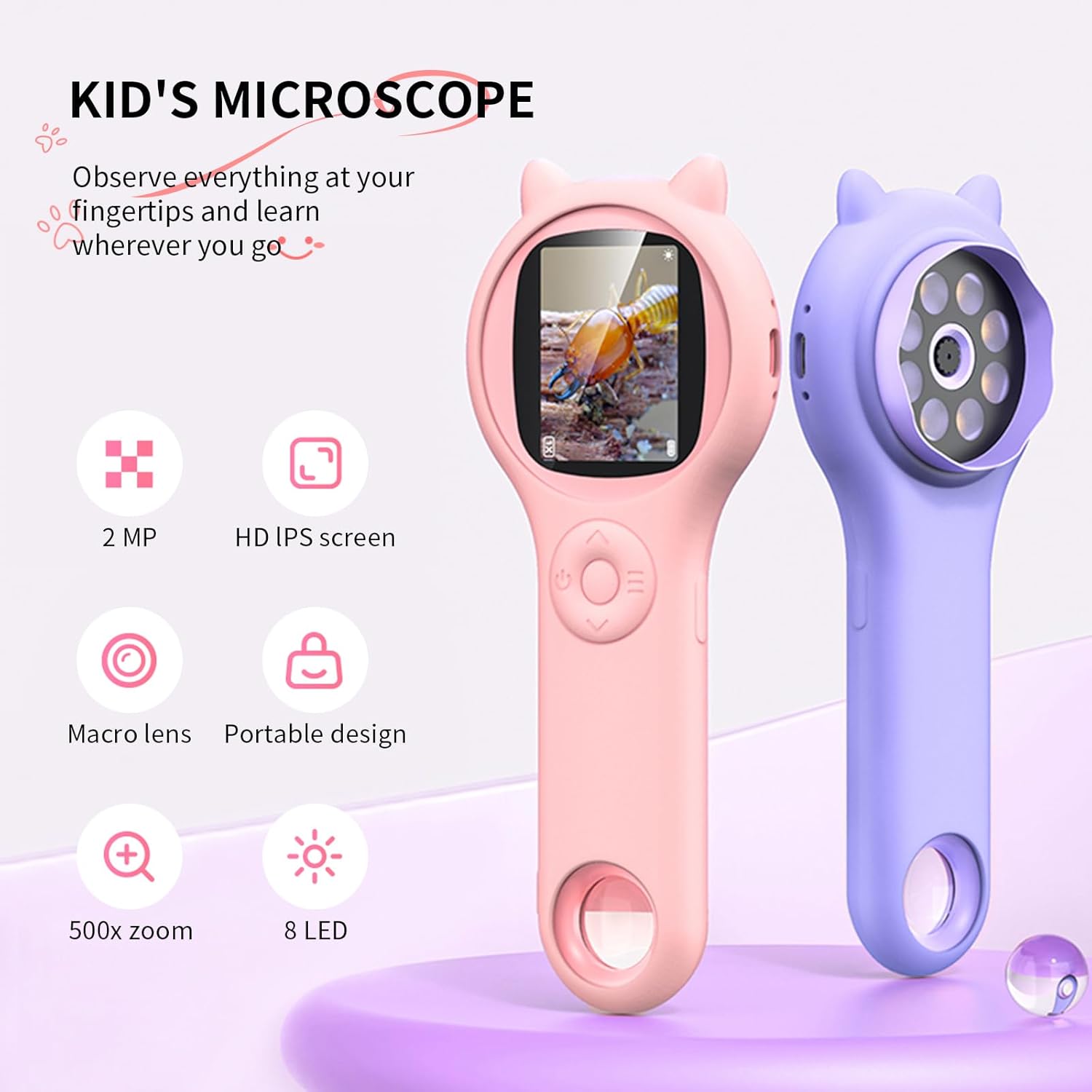
Image: Two Ashfly Kids Microscopes, one pink and one purple, illustrating the compact design and the different lenses/screens on each side.
Mirëmbajtja
- Pastrimi: Use a soft, dry cloth to clean the exterior of the microscope. For the lens and screen, use a specialized lens cleaning cloth. Do not use abrasive cleaners or solvents.
- Magazinimi: Ruajeni mikroskopin në një vend të freskët dhe të thatë, larg rrezeve të diellit dhe temperaturave ekstreme.
- Kujdesi për baterinë: Për të zgjatur jetëgjatësinë e baterisë, shmangni shkarkimin e saj të plotë shpesh. Ngarkojeni pajisjen rregullisht, edhe nëse nuk është në përdorim për periudha të gjata kohore.
Zgjidhja e problemeve
| Problem | Shkaku i mundshëm | Zgjidhje |
|---|---|---|
| Pajisja nuk ndizet. | Bateria është e shkarkuar. | Ngarkoni pajisjen duke përdorur kabllon USB të dhënë. |
| Image on screen is blurry. | Incorrect focus or distance from object. | Adjust the microscope's distance from the object or use the focus wheel (if applicable) until the image is clear. |
| Cannot capture photos/videos. | Internal memory is full. | Transfer existing photos/videos to a computer to free up space. |
Specifikimet
| Veçori | Detaj |
|---|---|
| Model | ASIN B0DBVB3RGT |
| Markë | Ashfly |
| Zmadhimi | Up to 200x (with 4x zoom adjustment) |
| Ekrani | 2-inch LCD, 1080P HD digital imaging |
| Burimi i dritës | LED |
| Materiali | Plastike |
| Ngjyra | Vjollcë |
| Burimi i energjisë | Mundësuar nga bateria |
| Lente objektive | Akromatike |
Informacioni i Garancisë
Ashfly products are designed for quality and durability. For specific warranty details, please refer to the warranty card included with your product or visit the official Ashfly webvend. Ruajeni faturën e blerjes si provë blerjeje për kërkesat e garancisë.
Mbështetja e klientit
If you encounter any issues or have questions regarding your Ashfly Portable Handheld Kids Microscope, please contact our customer support team:
- Ndihma në internet: Vizitoni Ashfly Store on Amazon për pyetje të shpeshta dhe opsione kontakti.
- Email: Referojuni paketimit të produktit ose dokumentit zyrtar webfaqe interneti për mbështetje të drejtpërdrejtë me email.


