Hyrje
Thank you for choosing the KLIM K7 Cassette Tape Player and MP3 Converter. This device allows you to enjoy your classic cassette tapes and convert them into digital MP3 files for modern playback. It features a built-in microphone for recording, an integrated speaker, and a rechargeable battery for portability. This manual provides detailed instructions for setup, operation, and maintenance of your KLIM K7.
Produkti Mbiview
Karakteristikat kryesore
- Cassette to MP3 Converter: Effortlessly convert cassette tapes to digital MP3 files directly onto an SD card.
- Dizajni portativ: Lightweight and compact for on-the-go listening.
- Mikrofoni i integruar: Record audio directly to the SD card.
- Altoparlanti i integruar: Share your audio without external devices.
- Bateria e rikarikueshme: Integrated 1000mAh battery provides extended playback.
- SD Card Player: Luaj MP3 fileruhen në kartën SD.
- Dalja e kufjeve 3.5 mm: For private listening with included earphones.
Komponentët dhe kontrollet e pajisjes
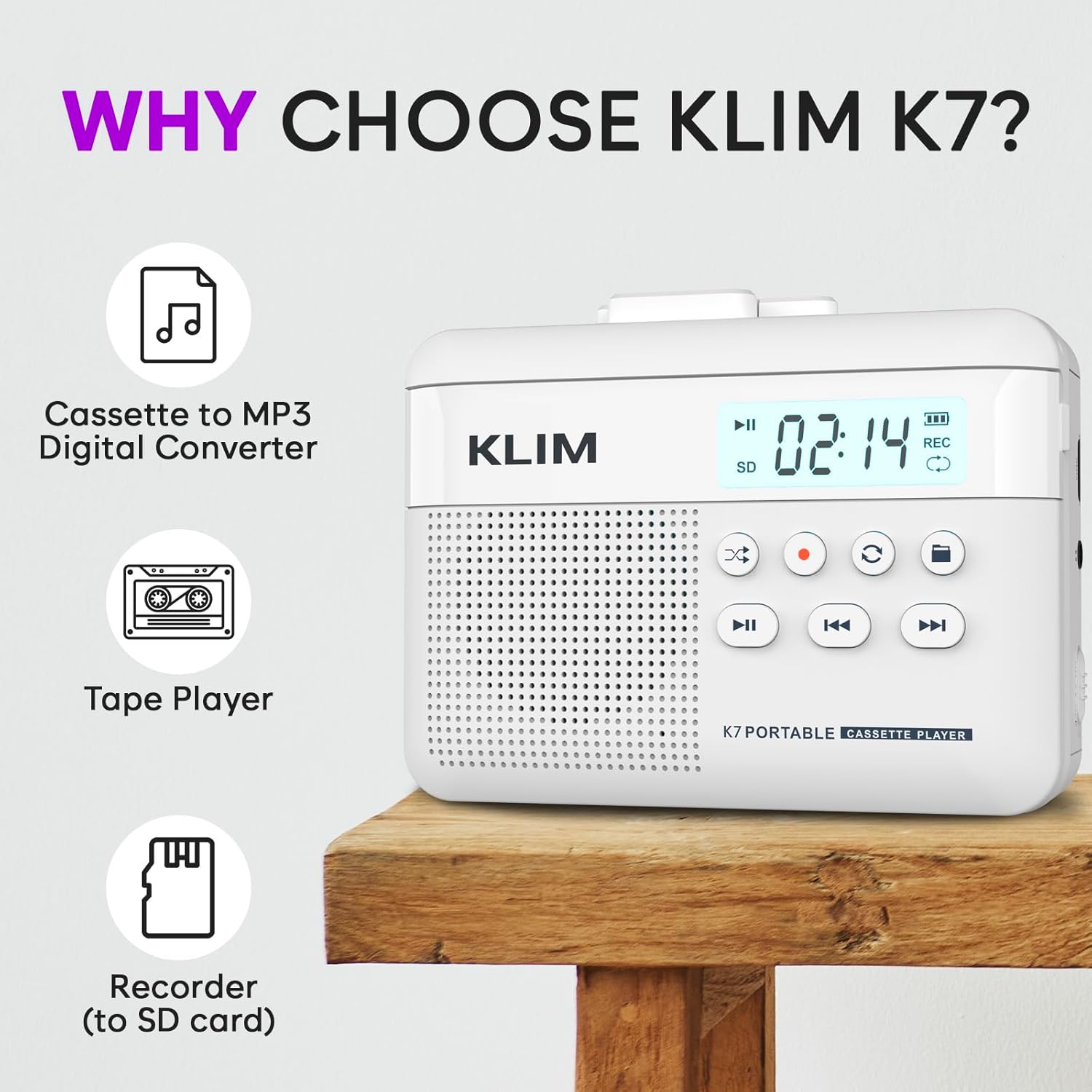
Figura 1: Përpara view of the KLIM K7 Cassette Player, showing the speaker grille, LCD display, and control buttons (Play/Pause, Rewind, Fast Forward, Stop, Record, Mode, Folder, Loop).
- Ekrani LCD: Shows track number, recording status, and battery level.
- Folësi: Altoparlant i integruar për riprodhimin e audios.
- Play/Pause Button (►▮): Fillon ose ndërpret riprodhimin.
- Rewind Button (◀◀): Rewinds the cassette tape or navigates backward through MP3 tracks.
- Fast Forward Button (►►): Fast forwards the cassette tape or navigates forward through MP3 tracks.
- Stop Button (■): Ndalon riprodhimin ose regjistrimin.
- Record Button (●): Initiates or stops recording.
- Mode Button (↻): Switches between cassette playback and SD card MP3 playback.
- Folder Button (🖿): Navigates through folders on the SD card.
- Loop Button (⟳): Përsërit këngën aktuale ose të gjitha këngët.

Figura 2: Anash view of the KLIM K7 Cassette Player, highlighting the SD card slot, 3.5mm headphone jack, and On/Off switch.
- Vendi i kartës SD: Insert your Micro SD card here for recording and MP3 playback.
- Dalja e kufjeve 3.5 mm: Connect the included earphones or other standard headphones.
- Çelësi i ndezjes/fikjes: Ndez ose fik pajisjen.
- Kontrolli i volumit: Rregullon nivelin e daljes audio.

Figura 3: Top view of the KLIM K7 Cassette Player with the cassette compartment open, showing the tape mechanism.
- Ndarja e kasetës: Insert your cassette tapes here.
- Cassette Door Release: Opens the cassette compartment.
Konfigurimi
1. Ngarkimi i baterisë
Before first use, fully charge the KLIM K7. The device comes with a 1000mAh rechargeable battery.
- Locate the Type-C USB charging port on the side of the device.
- Connect the included Type-C USB cable to the charging port and the other end to a USB power adapter (not included) or a computer's USB port.
- The charging indicator on the LCD display will show charging status. A full charge typically takes approximately 2 hours.

Figura 4: The KLIM K7 connected to a Type-C USB cable for charging.
2. Futja e një karte SD
An SD card (16GB included) is required for converting tapes to MP3 and for recording with the built-in microphone.
- Locate the SD card slot on the side of the device (refer to Figure 2).
- Futeni butësisht kartën Micro SD në vend me kontaktet e arta poshtë derisa të klikojë në vendin e saj.
- To remove, push the SD card inward until it clicks, then release, and it will eject.

Figura 5: Inserting the Micro SD card into the KLIM K7.
3. Inserting a Cassette Tape
- Press the Cassette Door Release button to open the cassette compartment.
- Insert your cassette tape with the open side facing upwards and the tape reels aligned with the player's mechanism.
- Mbylleni fort derën e ndarjes së kasetës derisa të klikojë.
Udhëzimet e funksionimit
1. Luajtja e Kasetave
- Ensure the device is powered on using the On/Off switch.
- Insert a cassette tape as described in the Setup section.
- Shtypni Play/Pause (►▮) butoni për të filluar riprodhimin.
- Rregulloni volumin duke përdorur kontrollin e volumit.
- Përdorni Rewind (◀◀) dhe Përpara shpejt (►►) butona për të lundruar në kasetë.
- Shtypni Ndalo (■) butonin për të përfunduar riprodhimin.
2. Converting Cassette Tapes to MP3
The KLIM K7 allows direct conversion of cassette audio to MP3 files on the inserted SD card, without needing a computer or additional software.
- Ensure an SD card is inserted and the device is powered on.
- Insert the cassette tape you wish to convert.
- Shtypni Play/Pause (►▮) button to start playing the tape.
- Shtypja e gjatë të Regjistro (●) button. The 'REC' indicator on the LCD display will illuminate, indicating that recording has started.
- Për të ndaluar regjistrimin, shtypni Regjistro (●) button again. The 'REC' indicator will turn off. The recorded audio will be saved as an MP3 file në kartën SD.
- You can then remove the SD card and use the included SD card reader to transfer the MP3 files to a computer or other device.

Figura 6: Visual guide for converting cassette audio to MP3 files.
3. Using the Built-in Microphone for Recording
The KLIM K7 can also record audio directly from its built-in microphone to the SD card.
- Ensure an SD card is inserted and the device is powered on.
- Shtypni Mode (↻) button until the device is in SD card mode (no cassette playing).
- Shtypja e gjatë të Regjistro (●) button. The 'REC' indicator will light up, and the device will start recording audio from its microphone.
- Për të ndaluar regjistrimin, shtypni Regjistro (●) button again. The 'REC' indicator will turn off, and the recording will be saved as an MP3 file.

Figura 7: Using the KLIM K7's built-in microphone for recording.
4. Playing MP3 Files from SD Card
- Ensure an SD card with MP3 files is inserted and the device is powered on.
- Shtypni Mode (↻) button to switch to SD card playback mode. The LCD display will show track information.
- Shtypni Play/Pause (►▮) butoni për të filluar riprodhimin.
- Përdorni Rewind (◀◀) dhe Përpara shpejt (►►) butonat për të kapërcyer gjurmët.
- Të Folder (🖿) button allows navigation through different folders on the SD card.
- Të Loop (⟳) button can be used to repeat the current track or all tracks.
- Rregulloni volumin duke përdorur kontrollin e volumit.
- Shtypni Ndalo (■) butonin për të përfunduar riprodhimin.

Figura 8: Enjoying audio with the KLIM K7 and included earphones.
Mirëmbajtja
Proper maintenance ensures the longevity and optimal performance of your KLIM K7.
- Pastrimi: Përdorni një leckë të butë dhe të thatë për të pastruar pjesën e jashtme të pajisjes. Mos përdorni pastrues të lëngshëm ose tretës.
- Ndarja e kasetës: Pastroni periodikisht kokat e shiritit dhe shtrëngoni lehtë rrotullat me një shtupë pambuku.ampened with isopropyl alcohol to prevent audio quality degradation. Ensure the device is off and dry before use.
- Magazinimi: Ruajeni pajisjen në një vend të freskët dhe të thatë, larg rrezeve të diellit direkte dhe temperaturave ekstreme.
- Kujdesi për baterinë: Për ruajtje afatgjatë, ngarkoni baterinë deri në rreth 50% çdo disa muaj për të ruajtur gjendjen e saj.
Zgjidhja e problemeve
If you encounter any issues with your KLIM K7, please refer to the following common solutions:
| Problem | Shkaku i mundshëm | Zgjidhje |
|---|---|---|
| Pajisja nuk ndizet. | Bateria është e mbaruar. | Charge the device using the provided Type-C USB cable. |
| No sound during cassette playback. | Volume is too low or headphones are not connected properly. | Increase the volume. Ensure headphones are fully plugged into the 3.5mm jack. |
| Recording to MP3 fails or produces no file. | Karta SD është plot, nuk është futur siç duhet ose është dëmtuar. | Check SD card insertion. Ensure sufficient space on the SD card. Try reformatting the SD card (this will erase all data). |
| Poor audio quality from cassette. | Dirty tape heads or worn-out cassette tape. | Clean the tape heads and pinch rollers. Try a different cassette tape to determine if the issue is with the tape itself. |
| Pajisja ngrin ose nuk përgjigjet. | Gabim i përkohshëm i softuerit. | Turn the device off and then on again. If the issue persists, allow the battery to fully discharge and then recharge. |
Specifikimet
- Dimensionet e produktit: 4.76 x 3.61 x 1.56 inç
- Pesha e artikullit: 9.9 ons
- Bateria: 1 bateri litium-jon (e përfshirë), 1000mAh
- Koha e karikimit: Përafërsisht 2 orë
- Magazinimi: Supports Micro SD card (16GB included)
- Dalja audio: Built-in speaker, 3.5mm headphone jack
- Formati i regjistrimit: MP3

Figura 9: Dimensions of the KLIM K7 Cassette Player.
Garancia dhe Mbështetja
KLIM is committed to producing quality electronics. The KLIM K7 Cassette Tape Player comes with a 5-year assurance. If you encounter any problems with your device, please contact KLIM customer support for assistance.
Plane shtesë mbrojtjeje mund të jenë të disponueshme për blerje:
- Plani 2-vjeçar i Mbrojtjes: $3.99 (one-time)
- Plani 3-vjeçar i Mbrojtjes: $5.99 (one-time)
- NEW Complete Protect: $16.99 (monthly)
Për më shumë mbështetje, vizitoni KLIM Store on Amazon.


