1. Hyrje
This manual provides detailed instructions for the installation, operation, and maintenance of your VANBAR 2-in-1 Android Car Wireless Adapter. This device converts your car's wired Apple CarPlay or Android Auto system into a wireless connection, enhancing convenience and user experience.
2. Informacion mbi sigurinë
- Mos u përpiqni ta çmontoni ose modifikoni pajisjen.
- Mbajeni pajisjen larg ujit, lagështirës dhe temperaturave ekstreme.
- Ensure the device is securely placed to avoid obstruction while driving.
- Operate the device responsibly and avoid distractions while driving.
3. Përmbajtja e paketës
Ju lutemi kontrolloni paketën për artikujt e mëposhtëm:
- VANBAR 2-in-1 Wireless Adapter (Model: Carplay01)
- USB-A to USB-C Adapter Cable
- Manuali i Përdoruesit (ky dokument)
4. Produkti i Mbaruarview
The VANBAR 2-in-1 Wireless Adapter is a compact device designed to enable wireless Apple CarPlay and Android Auto in compatible vehicles. It features a durable alloy casing for efficient heat dissipation and includes both USB-A and USB-C connectivity options.

Image 4.1: VANBAR 2-in-1 Wireless Adapter showing USB-A and USB-C connectivity. The adapter is a small black square with a USB cable attached, and an additional USB-C adapter is shown.

Image 4.2: Diagram illustrating the internal structure of the adapter, highlighting the glass and metal alloy components for excellent heat dissipation.
5. Udhëzime për konfigurimin
Ndiqni këto hapa për konfigurimin fillestar:
- Lidhni përshtatësin:
Plug the VANBAR wireless adapter into your car's USB port that supports wired Apple CarPlay or Android Auto. Use the provided USB-C adapter if your car has a USB-C port.
- Çiftohet përmes Bluetooth:
Në telefonin tuaj inteligjent, aktivizoni Bluetooth dhe Wi-Fi. Kërko për the adapter's Bluetooth name (e.g., "VANBAR-XXXX") and pair with it. Confirm any pairing requests on your phone and car display.
- Lidhja automatike:
Once paired, the adapter will automatically connect to your phone via Wi-Fi to initiate Apple CarPlay or Android Auto. The car's display should switch to the CarPlay or Android Auto interface.

Image 5.1: Visual guide for connecting the adapter to the car's USB port, pairing via Bluetooth, and the automatic connection process.
6. Udhëzimet e funksionimit
After successful setup, the adapter will automatically connect to your smartphone when you start your car. You can then use Apple CarPlay or Android Auto wirelessly.
- Navigimi: Use your preferred navigation apps directly on your car's display.
- Muzikë dhe Media: Stream music, podcasts, and audiobooks.
- Thirrjet dhe Mesazhet: Make and receive calls, and send/receive messages using voice commands or the car's interface.
- Kontrolli i zërit: Utilize Siri (for Apple CarPlay) or Google Assistant (for Android Auto) for hands-free operation.

Imazhi 6.1: P.sh.ample of a car display showing multiple CarPlay functions simultaneously, including navigation, music playback, and an incoming call.

Image 6.2: Illustration of different control methods for the car's infotainment system, including touchscreen, steering wheel buttons, and a central rotary knob.
7. Përputhshmëria
This wireless adapter is designed for vehicles equipped with factory-wired Apple CarPlay or Android Auto. It supports:
- Automjetet: Compatible with most car models from 2015 onwards that have wired CarPlay/Android Auto.
- Telefonat inteligjentë:
- Apple CarPlay: Requires iPhone with iOS 10 or later.
- Android Auto: Requires Android phone with Android 11 or later.
For detailed compatibility lists, please refer to the official resources:
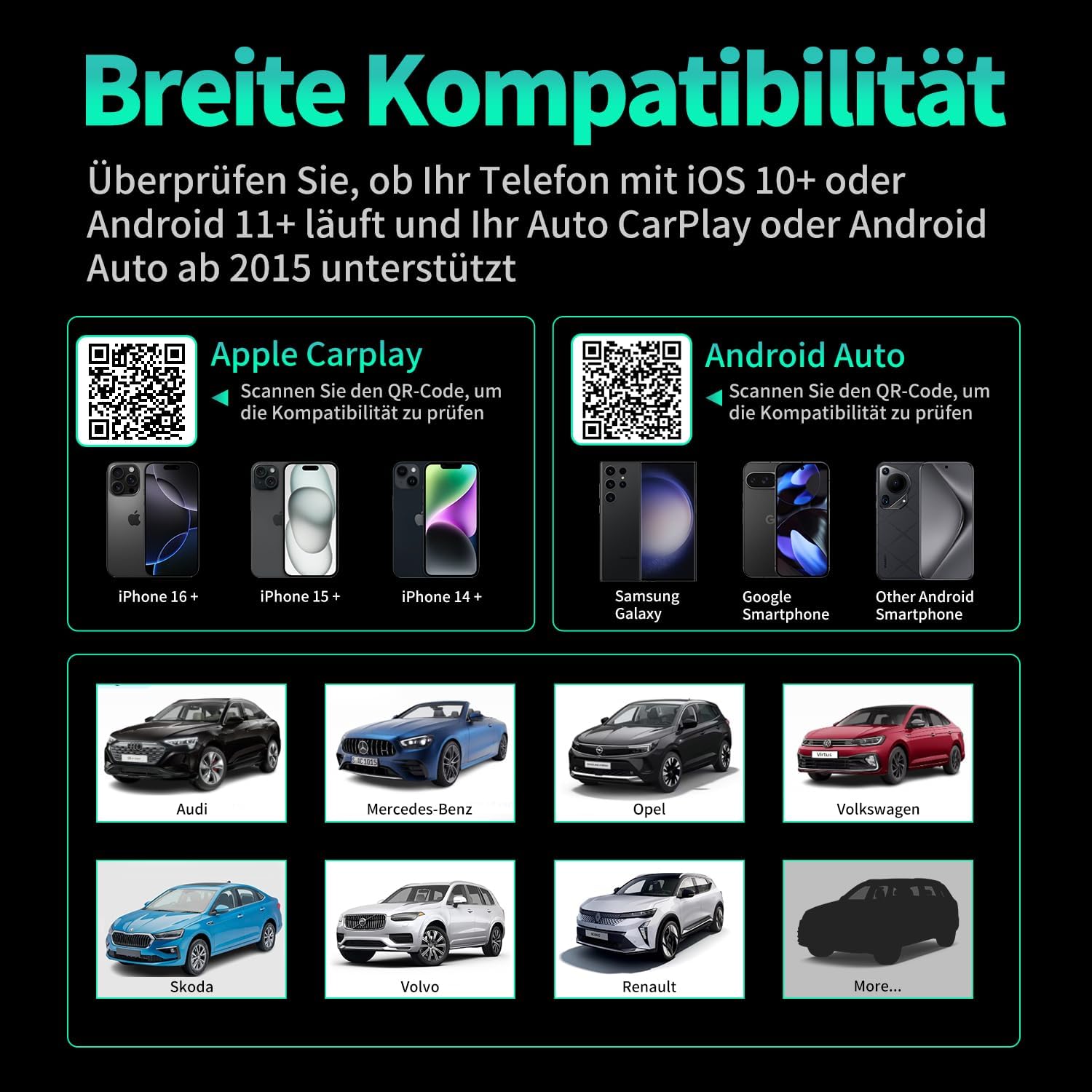
Imazhi 7.1: Përputhshmëria mbiview displaying supported iPhone models (14+, 15+, 16+), Samsung Galaxy, Google, and other Android smartphones, along with car brands like Audi, Mercedes-Benz, Opel, Volkswagen, Skoda, Volvo, and Renault.
8. Mirëmbajtja
- Pastrimi: Fshijeni pajisjen me një leckë të butë dhe të thatë. Mos përdorni pastrues të lëngshëm ose materiale gërryese.
- Magazinimi: Ruajeni pajisjen në një vend të freskët dhe të thatë kur nuk e përdorni për periudha të gjata.
- Përditësimet e firmuerit: Kontrolloni të prodhuesit webkontrolloni faqen periodikisht për çdo përditësim të disponueshëm të firmware-it për të siguruar performancë dhe përputhshmëri optimale.
9. Troubleshooting
| Problem | Shkaku i mundshëm | Zgjidhje |
|---|---|---|
| Adapter not connecting to car. | Incorrect USB port, car not compatible, loose connection. | Ensure the adapter is plugged into the correct USB port that supports wired CarPlay/Android Auto. Verify car compatibility. Re-plug the adapter firmly. |
| Phone not connecting to adapter. | Bluetooth/Wi-Fi off, incorrect pairing, phone OS not supported. | Ensure Bluetooth and Wi-Fi are enabled on your phone. Forget previous Bluetooth connections and re-pair. Check phone OS version for compatibility (iOS 10+, Android 11+). |
| Lidhje ose vonesë me ndërprerje. | Interference, weak signal, outdated firmware. | Ensure no other devices are causing Wi-Fi interference. Try restarting both the car's infotainment system and your phone. Check for firmware updates. |
| CarPlay/Android Auto nuk hapet. | CarPlay/Android Auto not enabled in car settings, app issues. | Check your car's infotainment settings to ensure CarPlay/Android Auto is enabled. Restart your phone and the car's system. |
10. Specifikimet
| Numri i modelit | Carplay01 |
| Markë | VANBAR |
| Teknologjia e lidhjes | Bluetooth 5.0, Wi-Fi (2.4 GHz + 5 GHz), USB |
| Pajisjet e përputhshme | Smartphones (iOS 10+, Android 11+) |
| Lloji i lidhësit | USB Type A, USB Type C (with adapter) |
| Dimensionet e produktit | 1 x 5.5 x 4.5 cm |
| Pesha e artikullit | 12 g |
| Ngjyra | E zezë |
| Karakteristika të veçanta | Wireless Android Auto, Wireless Apple CarPlay, GPS Navigation, Spotify, iHeart Radio support |
11. Garancia dhe Mbështetja
For warranty information and technical support, please refer to the official VANBAR webnë faqen e internetit ose kontaktoni direkt shërbimin e tyre ndaj klientit. Ruajeni faturën e blerjes për kërkesat e garancisë.


