1. Hyrje
This manual provides essential information for the safe and efficient use of your MESWAO 15.6 Inch Pro Android 14 Tablet. Please read this manual thoroughly before operating the device and retain it for future reference.
2. Informacion mbi sigurinë
- Mos e ekspozoni tabletën ndaj temperaturave ekstreme, rrezeve të diellit direkte ose lagështisë së lartë.
- Shmangni rënien ose ekspozimin e tabletës ndaj goditjeve të forta.
- Use only the provided power adapter and Type-C cable for charging.
- Mbajeni tabletën larg ujit dhe lëngjeve të tjera.
- Do not attempt to disassemble or repair the tablet yourself. Contact customer support for assistance.
- Ensure proper ventilation when using the tablet for extended periods.
3. Përmbajtja e paketës
Verifikoni që të gjitha sendet janë të pranishme në paketim:
- 1 x Tabletë Android MESWAO 15.6 inç
- 1 x përshtatës energjie
- 1 x kabllo të tipit C
- 1 x Manuali i Përdoruesit
- 1 x përshtatës Type-C në USB
- 1 x Stuck pin
4. Pajisja Mbaroiview
Familiarize yourself with the physical components of your MESWAO tablet.
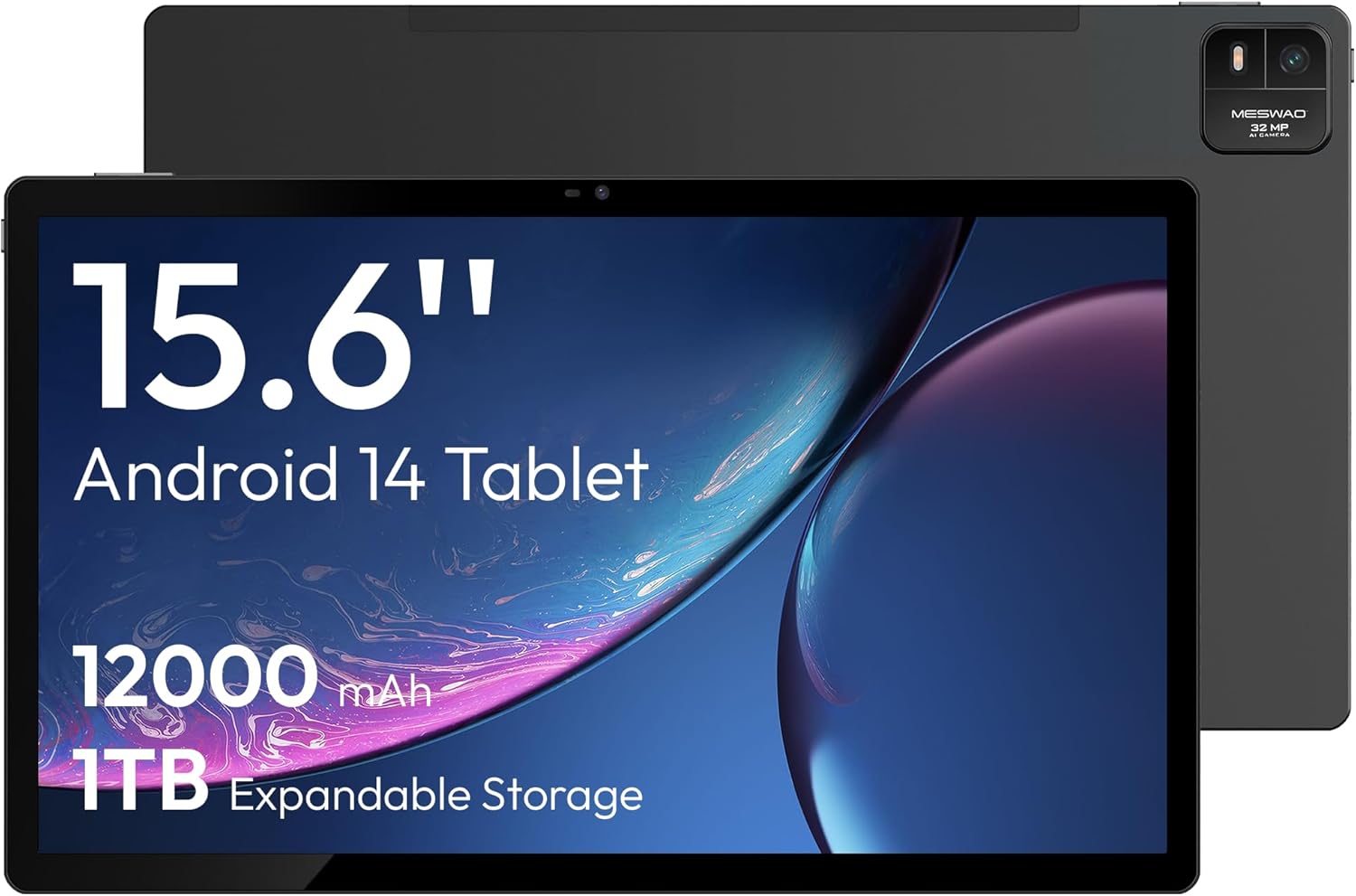
Figura 4.1: Përpara view of the MESWAO 15.6-inch Android 14 Tablet, highlighting the large display and key specifications such as 12000mAh battery and 1TB expandable storage.
Figura 4.2: Ana dhe mbrapa view of the tablet, indicating the location of the quad speakers, Type-C port, TF card slot, power button, volume controls, and front/rear cameras.
Komponentët kryesorë:
- Ekran IPS FHD 15.6 inç: Large screen for immersive viewing.
- Kamera e përparme: Për video thirrje dhe selfie.
- Kamera e pasme (32MP): Për të kapur foto dhe video.
- Butoni i energjisë: To turn the tablet on/off or put it to sleep.
- Butonat e volumit: Për të rregulluar nivelet e audios.
- Porti Type-C: Për karikimin dhe transferimin e të dhënave.
- Vendi i kartës TF: For expandable storage (MicroSD card).
- Katër altoparlantë: Për dalje audio.
5. Konfigurimi
5.1 Ngarkimi fillestar
Before first use, fully charge the tablet. Connect the provided Type-C cable to the tablet's Type-C port and the power adapter to a wall outlet. The tablet supports 30W fast charging.

Figura 5.1: The tablet connected to its charger, showing the charging indicator on the screen.
5.2 Ndez/Fik
- Për të ndezur: Shtypni dhe mbani shtypur butonin e energjisë derisa ekrani të ndizet.
- Për të fikur: Shtypni dhe mbani shtypur butonin e ndezjes, pastaj zgjidhni 'Fik' nga opsionet në ekran.
- Për të fjetur/zgjuar: Shtypni shkurtimisht butonin e energjisë.
5.3 Konfigurimi fillestar
Upon first power-on, follow the on-screen prompts to set up your Android 14 operating system. This includes selecting your language, connecting to Wi-Fi, and signing in with your Google account.
5.4 Lidhja Wi-Fi
- Shko tek Cilësimet > Rrjeti dhe interneti > Wi-Fi.
- Aktivizo/çaktivizo Wi-Fi-në On.
- Zgjidhni rrjetin e dëshiruar nga lista.
- Futni fjalëkalimin nëse ju kërkohet dhe trokitni lehtë Lidhu. The tablet supports dual-band Wi-Fi (2.4GHz and 5GHz).
5.5 Vendosja e një karte MicroSD
To expand storage up to 1TB, insert a MicroSD card:
- Gjeni vendin e kartës TF në anën e tabletit.
- Përdorni kunjin e ngulur të dhënë për të shtypur butësisht në vrimën e vogël pranë vendit për të nxjerrë tabakanë.
- Vendosni kartën MicroSD në tabaka me kontaktet e arta poshtë.
- Vendoseni me kujdes tabakanë në tabletë.

Figura 5.2: Illustration of the tablet's internal storage and the option for expandable storage via MicroSD card.
6. Përdorimi i tabletit
6.1 Navigimi bazë
The Android 14 operating system uses touch gestures for navigation:
- Trokit: Zgjidhni një artikull ose hapni një aplikacion.
- Rrëshqitni: Shfletoni ekranet ose listat.
- Majë: Zmadhoni ose zvogëloni imazhet dhe web faqet.
- Shtypi i gjatë: Hyni në menutë kontekstuale ose lëvizni ikonat.
6.2 Karakteristikat e ekranit
The 15.6-inch FHD IPS display offers a resolution of 1920 x 1080 pixels, providing clear and vibrant visuals for various applications.

Figura 6.1: Comparison of the MESWAO 15.6-inch display size to an A4 sheet of paper and a smaller tablet, emphasizing its expansive viewzona ing.
6.3 Performanca
Powered by the Helio G99 octa-core processor and 8GB RAM, the tablet delivers efficient performance for multitasking, gaming, and media consumption.

Figura 6.2: An illustration of the Helio G99 Octa-Core chipset, detailing its technical specifications and performance benefits.
6.4 Përdorimi i Kamerës
The tablet features a 32MP rear camera and a 5MP front camera. Open the Camera app to capture photos and videos.
6.5 Audio
The quad speakers provide clear audio. You can connect Bluetooth headphones or use the Type-C port for audio output with a suitable adapter.
6.6 Karakteristikat e Android 14
The tablet runs on Android 14, offering features such as:
- Smooth Multitasking: Efficiently switch between applications.
- Kontrolli prindëror: Manage content and usage for children.
- Enhanced Privacy & UI: Improved security and user interface experience.

Figura 6.3: The Android 14 operating system interface, showcasing various applications and system features.
7. Mirëmbajtja
7.1 Pastrimi i pajisjes
Përdorni një leckë të butë pa push për të pastruar ekranin dhe trupin e tabletit. Shmangni përdorimin e kimikateve të ashpra ose materialeve gërryese.
7.2 Përditësimet e softuerit
Kontrolloni rregullisht për përditësime të sistemit për të siguruar performancë dhe siguri optimale. Shkoni te Cilësimet > Sistemi > Përditësimi i sistemit.
7.3 Kujdesi për baterinë
Për të zgjatur jetën e baterisë:
- Shmangni shkarkimin e plotë të baterisë shpesh.
- Do not expose the tablet to high temperatures.
- Shkëputeni nga priza pasi bateria të jetë plot.
8. Troubleshooting
8.1 Tableti nuk ndizet
- Sigurohuni që bateria është e ngarkuar. Lidhni ngarkuesin dhe prisni disa minuta para se të përpiqeni ta ndizni.
- Shtypni dhe mbani shtypur butonin e ndezjes për të paktën 10-15 sekonda për të detyruar një rinisje.
8.2 Probleme me lidhjen Wi-Fi
- Rinisni routerin tuaj Wi-Fi.
- Harrojeni rrjetin në cilësimet e tabletit dhe rilidhuni.
- Sigurohuni që tableti të jetë brenda rrezes së sinjalit Wi-Fi.
8.3 Performancë e ngadaltë
- Mbyllni aplikacionet e panevojshme në sfond.
- Clear cache data for apps.
- Siguroni hapësirë të mjaftueshme të lirë për ruajtje.
8.4 Ekrani nuk përgjigjet
- Rinisni tabletin.
- Sigurohuni që ekrani të jetë i pastër dhe pa mbeturina.
9. Specifikimet
| Veçori | Specifikimi |
|---|---|
| Emri i modelit | MASH-B3 |
| Sistemi Operativ | Android 14 |
| Madhësia e ekranit | 15.6 inç |
| Rezolucioni i ekranit | 1920 x 1080 piksel (FHD) |
| Përpunues | MediaTek Helio G99 Octa-Core |
| Bashkëprocesor grafik | Mali-G75 |
| RAM | 8 GB |
| Hapësirë ruajtëse e brendshme (ROM) | 256 GB |
| Hapësirë ruajtëse e zgjerueshme | Deri në 1TB nëpërmjet kartës MicroSD |
| Kamera e pasme | 32 MP |
| Kamera e përparme | 5 MP |
| Kapaciteti i baterisë | 12000 mAh |
| Ngarkimi | Karikimi i shpejtë 30 W |
| Lidhja me valë | Dual-Band Wi-Fi (802.11a/b/ac/ad/ax), Bluetooth |
| Pesha e artikullit | 4.55 paund |
| Dimensionet e produktit | 14.49 x 8.66 x 0.39 inç |
10. Garancia dhe Mbështetja
10.1 Informacioni i garancisë
Your MESWAO tablet comes with a 12 muaj garanci mbulimi i defekteve të prodhimit. Ju lutemi ruani provën e blerjes për kërkesat e garancisë.
10.2 Mbështetja e klientit
For technical assistance, troubleshooting, or warranty inquiries, please contact MESWAO customer support. Our support team is available to assist you.
- Mbështetja 24-orëshe e klientit: Ndihma është në dispozicion 24 orë.
- Local After-sales Centers: Service centers are available in regions including the US, Germany, Japan, and more.
- Quick Response Flow: Issues reported receive a team response within 24 hours, aiming for prompt problem resolution or replacement.


