Hyrje
Welcome to your JLab Go Lux ANC Wireless Headphones. This manual provides detailed instructions to help you get the most out of your new headphones, covering setup, operation, maintenance, and troubleshooting.
Çfarë ka në Kuti
- JLab Go Lux ANC Wireless Headphones
- Kabllo karikimi USB-C

Image: JLab Go Lux ANC Headphones and included USB-C charging cable.
Produkti Mbiview
Familiarize yourself with the key components and controls of your JLab Go Lux ANC Wireless Headphones.

Imazh: Nga afër view of the right earcup, highlighting the power button, volume controls, and ANC/Be Aware mode button.
Karakteristikat kryesore:
- Hybrid Active Noise Cancelling (ANC): Reduces external distractions by up to 30 dB.
- Modaliteti "Ji i Vetëdijshëm": Ju lejon të dëgjoni mjedisin përreth ndërsa dëgjoni audio.
- Cloud Foam Comfort: Ergonomically shaped Form-Fit Earcups with 1-inch Cloud Foam cushions and adjustable hinges for extended comfort.
- Përshtatja e Aplikacionit JLab: Personalize ANC/Be Aware settings, touch controls, and sound preferences.
- Thirrjet Crystal Clear: Equipped with noise-canceling microphones for clear communication.
- Bluetooth Multipoint: Lidhu me dy pajisje njëkohësisht.
- Wireless Share Mode: Share audio wirelessly between two Lux headphones.
- Çifti i shpejtë i Google dhe çifti i Microsoft Swift: Effortless pairing with Android and Windows devices.
- Google Find My Device: Gjeni vendndodhjen e kufjeve nëse i keni humbur.
- Dizajni i palosshëm: Rotating earcups for compact storage and portability.
Konfigurimi
1. Ngarkimi fillestar
Before first use, fully charge your headphones using the provided USB-C cable. The LED indicator will show charging status.
2. Ndez/Fik
- Ndezja: Shtypni dhe mbani butonin e energjisë derisa treguesi LED të ndizet.
- Fike: Shtypni dhe mbani butonin e energjisë derisa treguesi LED të fiket.
3. Çiftimi Bluetooth
- Turn on your JLab Go Lux ANC headphones.
- Kufjet do të hyjnë automatikisht në modalitetin e çiftëzimit (LED do të ndizet me blu/të kuqe).
- On your device (smartphone, laptop, etc.), open Bluetooth settings and select "JLab Go Lux ANC" from the list of available devices.
- Pasi të lidhet, drita LED do të ndizet vazhdimisht në blu.
Çifti i shpejtë i Google dhe çifti i Microsoft Swift: For supported Android and Windows 10/11 devices, simply turn on your headphones near the device, and a pop-up notification will prompt you to connect with a single click.
4. JLab App Customization
Download the JLab App from the App Store or Google Play Store to unlock full customization options for your headphones.
- Customize ANC/Be Aware settings.
- Adjust touch controls.
- Fine-tune sound with the equalizer (JLab Signature, Balance, Bass Boost presets available).
- Enable Safe Hearing with volume limits.
- Merrni përditësime të softuerit.

Image: The JLab App interface on a smartphone, demonstrating sound and noise control customization options.
Udhëzimet e funksionimit
1. Active Noise Cancelling (ANC) & Be Aware Mode
Toggle between ANC, Be Aware, and ANC Off modes using the dedicated button on the earcup.
- ANC hibride: Eliminates external distractions for an immersive audio experience.
- Modaliteti "Ji i Vetëdijshëm": Lejon që tingujt e ambientit të kalojnë, duke ju mbajtur të vetëdijshëm për mjedisin përreth.

Image: A person wearing the headphones, demonstrating the use of ANC or Be Aware mode in a public environment.
2. Funksionet e Thirrjeve
The built-in noise-canceling microphones ensure clear calls.
- Përgjigja/Përfundimi i telefonatës: Shtypni një herë butonin shumëfunksional.
- Refuzo thirrjen: Shtypni dhe mbani shtypur butonin shumëfunksional.
- Aktivizo "Asistentin e zërit": Shtypni dy herë butonin shumëfunksional.

Image: A person engaged in a phone call while wearing JLab Go Lux ANC headphones, emphasizing the clear call feature.
3. Luajtja e muzikës
- Luaj/Ndalu: Shtypni një herë butonin shumëfunksional.
- Vëllimi lart: Shtypni shkurt butonin '+'.
- Ule volumin: Shtypni shkurt butonin '-'.
- Pjesa tjetër: Shtypni gjatë butonin '+'.
- Pjesa e mëparshme: Shtypni gjatë butonin '-'.
4. Bluetooth Multipoint
Connect your headphones to two devices simultaneously. For example, connect to your laptop for work calls and your phone for music. The headphones will intelligently switch between devices.
5. Wireless Share Mode
Share your audio with another pair of JLab Lux headphones. Refer to the JLab App or JLab support for detailed instructions on activating Wireless Share Mode.
6. Google Find My Device
If you misplace your headphones, use the Google Find My Device feature to locate them. Ensure this feature is enabled and configured on your connected Android device.

Image: A person using the Google Find My Device app on a smartphone to locate their JLab headphones.
Komoditet dhe përshtatje
The JLab Go Lux ANC headphones are designed for comfort during extended use.
- Form-Fit Earcups: Ergonomically shaped to the natural outline of the ear.
- Cloud Foam Cushions: 1-inch thick cushions provide plush comfort.
- Adjustable Hinges: Customize the fit for various head sizes and shapes.

Image: A person wearing JLab Go Lux ANC headphones, showcasing the comfortable Cloud Foam earcups.
Karikimi dhe jeta e baterisë
Your JLab Go Lux ANC headphones offer extended battery life.
- Jetëgjatësia e baterisë: Up to 70+ hours of playtime (40+ hours with ANC on).
- Ngarkimi: Use the included USB-C cable to charge. A full charge typically takes a few hours.
- Treguesi LED: The LED light on the earcup indicates charging status and battery level.
Mirëmbajtja
- Clean headphones with a soft, damp pëlhurë. Shmangni kimikatet e forta.
- Ruani në një vend të freskët dhe të thatë kur nuk përdoret.
- Mos e ekspozoni ndaj temperaturave ekstreme ose lagështisë.
- The headphones are not water resistant. Avoid contact with liquids.
- The foldable design with rotating earcups allows for compact storage.
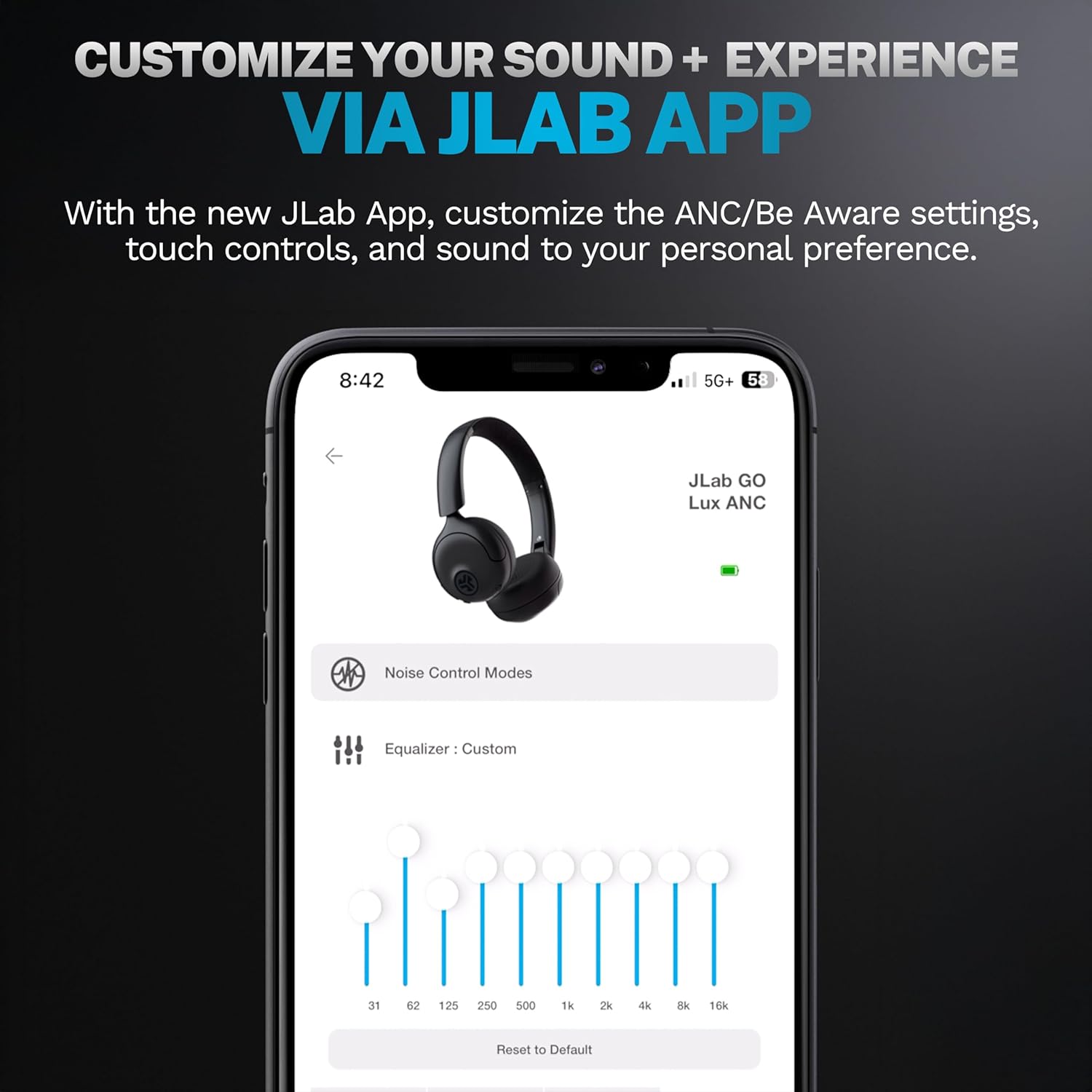
Image: JLab Go Lux ANC headphones in their folded position, demonstrating portability.
Zgjidhja e problemeve
| Problem | Zgjidhje |
|---|---|
| Kufjet nuk ndizen | Ensure headphones are charged. Press and hold the power button for 3-5 seconds. |
| Nuk mund të çiftëzohet me pajisjen | Make sure Bluetooth is enabled on your device. Ensure headphones are in pairing mode (flashing blue/red LED). Forget the device in your Bluetooth settings and re-pair. |
| Pa zë ose vëllim të ulët | Check volume levels on both headphones and your connected device. Ensure headphones are properly connected. |
| ANC nuk funksionon në mënyrë efektive | Ensure ANC mode is activated. Adjust headphone fit to ensure a good seal around your ears. |
| Probleme me cilësinë e thirrjeve | Ensure microphones are not obstructed. Check your device's connection and signal strength. |
Specifikimet
| Veçori | Detaj |
|---|---|
| Emri i modelit | HBGOLUXANCMVE20WEB |
| Teknologjia e lidhjes | Wireless (Bluetooth) |
| Versioni Bluetooth | 5.0 |
| Forma e kufjes | Në vesh |
| Karakteristikat e Kontrollit të Zhurmës | Hybrid Active Noise Canceling, Be Aware Mode |
| Lloji i drejtuesit të audios | Drajver Dinamik (40 mm) |
| Përgjigja e frekuencës | 20 Hz - 20 KHz |
| Ndjeshmëria | 104 dB |
| Jetëgjatësia e baterisë | Up to 70+ hours (40+ hours with ANC) |
| Metoda e kontrollit | Prekje, Kontroll Aplikacioni |
| Pesha e artikullit | 10.6 ons (0.3 kilogramë) |
| Dimensionet e produktit | 2.95 x 6.1 x 7.48 inç |
| Niveli i rezistencës ndaj ujit | Jo Rezistent ndaj ujit |
Garancia dhe Mbështetja
Kufjet tuaja pa tel JLab Go Lux ANC vijnë me një Garanci 2-vjeçare e JLab.
For detailed warranty information, product support, or to contact customer service, please visit the official JLab webfaqen e internetit ose referojuni kartës së garancisë që vjen me produktin tuaj.
Ju gjithashtu mund të vizitoni Dyqani JLab në Amazon për më shumë informacion dhe aksesorë.