1. Hyrje
Thank you for choosing the XINFUTE RM-L1346 Universal Remote Control. This remote is designed to be a direct replacement and universal fit for various Sharp TV models, including those originally using remote models like RC4847, GA779WJSA, and GA956. It offers straightforward operation without complex programming for most compatible models.
Përmbajtja e paketës:
- 1 x XINFUTE RM-L1346 Universal Remote Control
- Shënim: Bateritë nuk përfshihen.
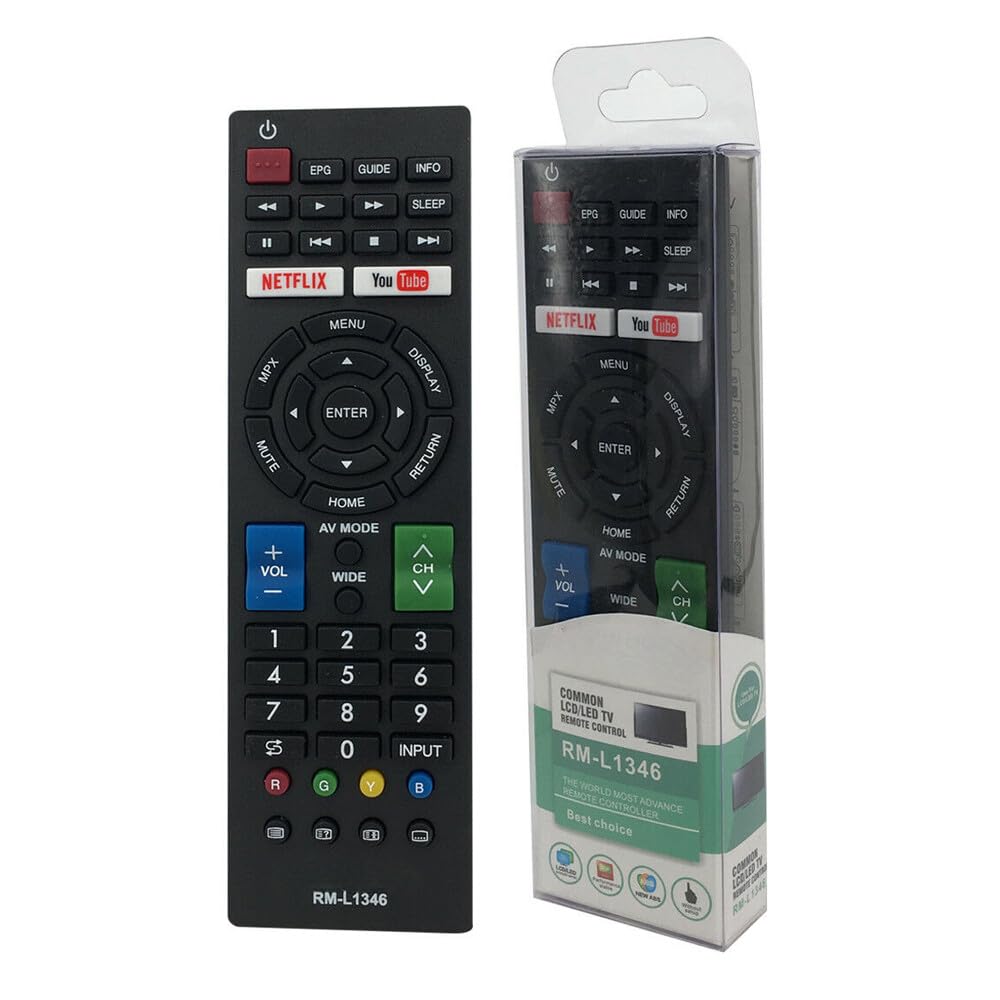
Figura 1: Përpara view of the RM-L1346 Universal Remote Control.
2. Konfigurimi
2.1 Instalimi i baterisë
The RM-L1346 remote control requires two (2) AAA batteries (not included). Follow these steps to install them:
- Gjeni kapakun e ndarjes së baterisë në pjesën e pasme të telekomandës.
- Shtypni poshtë mbi skedën dhe rrëshqitni kapakun poshtë për të hapur ndarjen.
- Vendosni dy bateri AAA, duke u siguruar që terminalet pozitive (+) dhe negative (-) të jenë në përputhje të saktë me shenjat brenda ndarjes.
- Rrëshqisni kapakun e ndarjes së baterisë përsëri në vendin e tij derisa të klikojë mirë.
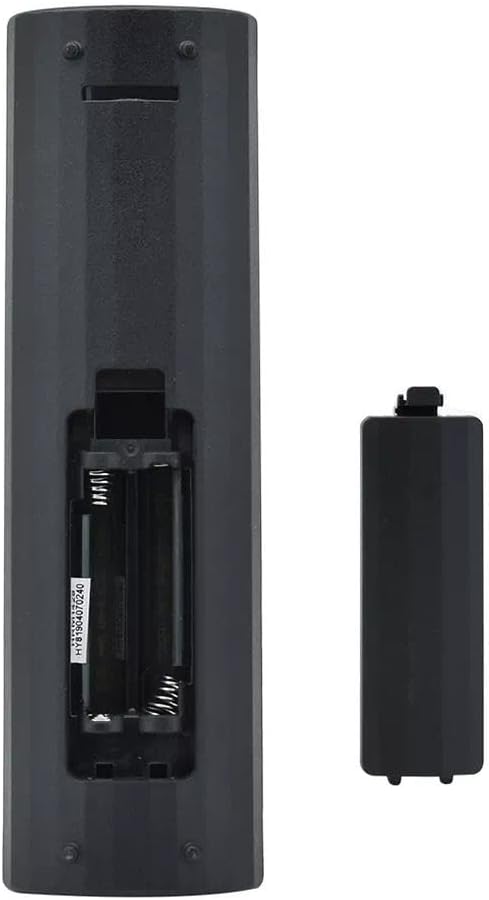
Figura 2: Ndarja e baterisë me mbulesën e hequr.
Important: Always replace both batteries at the same time. Do not mix old and new batteries, or different types of batteries. Remove batteries if the remote will not be used for an extended period.
3. Udhëzimet e funksionimit
The XINFUTE RM-L1346 is a universal replacement remote designed for direct use with most compatible Sharp TV models. No programming is typically required. Simply insert the batteries and point the remote towards your television.
3.1 Funksionet themelore
- Butoni i energjisë (⏻): Ndez ose fiket televizorin.
- Vëllimi lart/poshtë (VOL +/-): Rregullon volumin e zërit.
- Kanali Lart/Poshtë (CH +/-): Ndryshon kanalet televizive.
- Butoni i Heshtjes (MUTE): Heq ose aktivizon zërin e televizorit.
- Input/Source (INPUT): Kalon nëpër burimet e disponueshme të hyrjes (HDMI, AV, etj.).
- Menu Button (MENU): Qas në menynë kryesore të televizorit.
- Navigation Buttons (▲ ▼ ◀ ▶, ENTER): Përdoret për të lundruar në menu dhe për të konfirmuar përzgjedhjet.
- Home Button (HOME): Returns to the TV's smart home screen or main menu.
- Netflix / YouTube Buttons: Direct access buttons for these streaming services (functionality depends on TV model and internet connection).
- EPG / GUIDE / INFO: Accesses Electronic Program Guide, TV guide, or displays program information.
- Return Button (RETURN): Kthehet në ekranin ose menynë e mëparshme.
Note: The functionality of certain buttons (e.g., smart TV app buttons like Netflix/YouTube) may vary depending on your specific Sharp TV model and its features.
4. Mirëmbajtja
4.1 Pastrimi i telekomandës
Për të siguruar performancë optimale dhe jetëgjatësi të telekomandës suaj, ndiqni këto udhëzime pastrimi:
- Hiqni gjithmonë bateritë para pastrimit.
- Përdorni një leckë të butë dhe të thatë për të fshirë sipërfaqen e telekomandës.
- Për papastërtitë e forta, lehtë dampLani leckën me ujë ose me një pastrues të butë, jo-gërryes. Mos e spërkatni pastruesin direkt mbi telekomandë.
- Shmangni përdorimin e kimikateve të ashpra, tretësve ose sfungjerëve pastrues gërryes, pasi këto mund të dëmtojnë sipërfaqen e telekomandës ose pjesët e brendshme.
- Sigurohuni që telekomanda të jetë plotësisht e thatë përpara se të vendosni përsëri bateritë.
4.2 Ruajtja
When not in use for extended periods, store the remote control in a cool, dry place away from direct sunlight and extreme temperatures. Remove the batteries to prevent leakage and potential damage to the remote.
5. Troubleshooting
If you encounter issues with your XINFUTE RM-L1346 remote control, please refer to the following common troubleshooting steps:
5.1 Telekomanda nuk përgjigjet
- Kontrolloni bateritë: Ensure batteries are inserted correctly with the correct polarity (+/-). Replace with fresh AAA batteries.
- Vija e shikimit: Make sure there is a clear line of sight between the remote's infrared (IR) emitter and the TV's IR receiver. Obstructions can block the signal.
- Test në distancë: Point the remote at a digital camera (like a smartphone camera) and press any button. If you see a light flashing from the remote's front, it indicates the IR emitter is working. If not, the remote may be faulty or batteries are completely dead.
- Fuqia e TV: Ensure your TV is powered on and not in standby mode.
5.2 Limited Range or Intermittent Functionality
- Niveli i baterisë: Weak batteries can reduce the remote's effective range. Replace them.
- Ndërhyrja: Bright lights, direct sunlight, or other electronic devices can sometimes interfere with IR signals. Try using the remote in a different environment.
- Pengesat: Ensure no objects are blocking the path between the remote and the TV.
5.3 Specific Buttons Not Working
- Përputhshmëria e TV: While universal, some advanced or smart TV functions might not be fully supported by all replacement remotes. Refer to your TV's original manual for specific feature requirements.
- Stuck Buttons: Check if any buttons are physically stuck or jammed. Gently clean around the buttons if necessary (refer to Maintenance section).
6. Specifikimet
| Veçori | Specifikimi |
|---|---|
| Numri i modelit | RM-L1346 |
| Markë | XINFUTE |
| Pajisjet e përputhshme | Sharp Televisions (Universal fit for many models including those originally using RC4847, GA779WJSA, GA956) |
| Burimi i energjisë | 2 x bateri AAA (nuk përfshihen) |
| Materiali | Materiali ABS |
| Ngjyra | As Shown (Typically Black) |
| Dimensionet e produktit | 6 x 3 x 1 inç (përafërsisht) |
| Pesha e artikullit | 2.82 ons (pa bateri) |
| Veçori e veçantë | Dizajn ergonomik |
7. Garancia dhe Mbështetja
7.1 Informacioni i garancisë
This XINFUTE RM-L1346 Universal Remote Control comes with a një vit garanci që nga data e blerjes. Kjo garanci mbulon defektet e prodhimit dhe siguron që produkti të funksionojë siç është menduar në kushte normale përdorimi. Ju lutemi ruani provën e blerjes për kërkesat e garancisë.
7.2 Mbështetja e klientit
All products are inspected before shipment. If you are not satisfied with your purchase or require assistance, please contact the seller or retailer within 24 hours of receipt. For further support or warranty claims, please reach out to the XINFUTE customer service through the platform where the purchase was made.
For the latest information and support, you may visit the XINFUTE Store on Amazon.


