Udhëzime të rëndësishme të sigurisë
Ju lutemi lexoni dhe kuptoni të gjitha udhëzimet e sigurisë përpara se të përdorni këtë produkt. Ruajeni këtë manual për referencë në të ardhmen.
- Ventilimi: Siguroni ventilim të mjaftueshëm. Mos bllokoni asnjë hapje ventilimi.
- Uji dhe lagështia: Mos e ekspozoni këtë pajisje ndaj shiut ose lagështirës. Mos vendosni objekte të mbushura me lëngje, siç janë vazot, mbi pajisje.
- Burimet e nxehtësisë: Mos e instaloni pranë ndonjë burimi nxehtësie si radiatorë, regjistra ngrohjeje, soba ose aparate të tjera (përfshirë amplifiers) që prodhojnë nxehtësi.
- Burimet e energjisë: Use only power supplies specified by the manufacturer. Ensure the power cord is protected from being walked on or pinched.
- Pastrimi: Pastroni vetëm me një leckë të thatë.
- Servisimi: Mos u përpiqni ta shërbeni vetë këtë produkt. Drejtojini të gjithë shërbimet personelit të kualifikuar të shërbimit.
Përmbajtja e paketës
Verifikoni që të gjitha artikujt e listuar më poshtë janë të përfshirë në paketën tuaj:
- Kuephom CD-X2A Boombox
- Kordoni i rrymës AC
- Manuali i Përdoruesit (ky dokument)
- Telekomandë
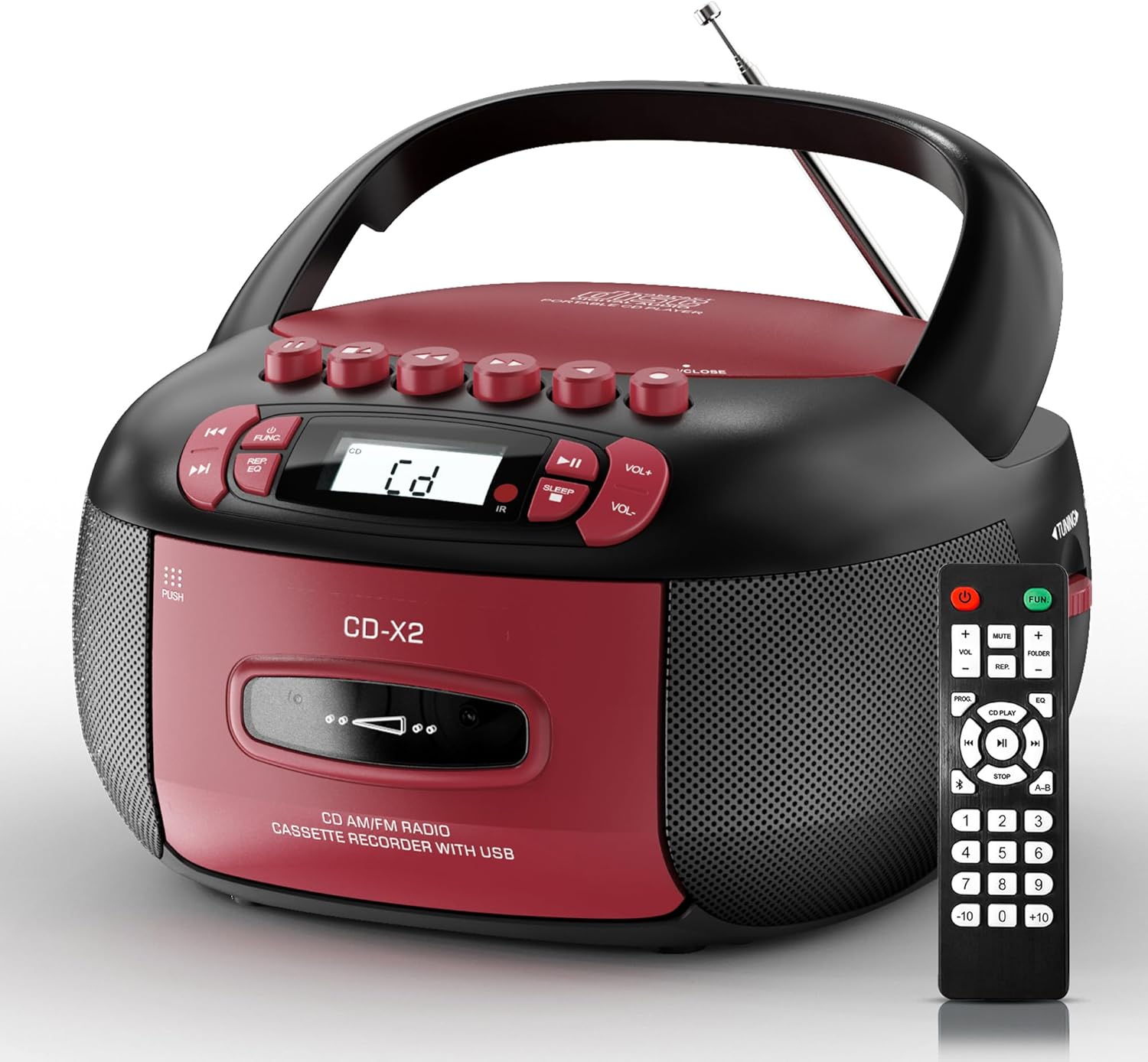
Image: The Kuephom CD-X2A Boombox with its included remote control, showcasing its compact design and red/black color scheme.
Produkti Mbiview
Familiarize yourself with the various components and controls of your Kuephom CD-X2A Boombox.
Kontrollet e panelit të përparmë
- Butoni i energjisë/funksionit: Press and hold to power on/off. Press to cycle through modes (CD, USB, Bluetooth, Radio, AUX, Tape).
- Butonat e volumit +/-: Rregulloni volumin e riprodhimit.
- Butoni i luajtjes/pauzës: Start or pause playback for CD, USB, Bluetooth, or Tape.
- Butoni i ndalimit: Ndalo luajtjen.
- Butonat e Kapërcimit/Kërkimit: Navigate between tracks on CD/USB or fast forward/rewind on tape.
- Butoni i EQ: Zgjidhni paracaktimet e barazuesit.
- Butoni i kohëmatësit të gjumit: Vendosni kohëmatësin e gjumit.
Kontrollet e panelit anësor
- Doreza e sintonizimit: Manually tune AM/FM radio stations.
- Jack kufje: Lidhni kufjet për dëgjim privat.
- Porta AUX-in: Lidhni pajisjet e jashtme audio.
- Porta USB: Insert USB drives for MP3/WMA playback.
Karakteristikat e Panelit të Lartë
- Ndarja e CD-ve: Top-loading compartment for CDs.
- Ndarja e kasetës: Ndarje me ngarkim nga përpara për kasetat.
- Antenë teleskopike: Extend for improved radio reception.

Image: The boombox highlighting its multiple functions including CD/MP3, Bluetooth, Type I/II tape, USB, FM/AM Radios, Sleep timer, Remote, Phone jack, AUX, and Tape recording.

Imazh: Nga afër views of the boombox's phone jack, top-loading CD player, telescopic antenna, and tape play/record buttons.
Konfigurimi
Powering the Boombox
Fuqia AC
- Connect the supplied AC power cord to the AC IN jack on the back of the boombox.
- Plug the other end of the power cord into a standard AC wall outlet (120V~60Hz).
Fuqia e baterisë
- Open the battery compartment cover located on the bottom of the boombox.
- Insert 6 x 'C' size batteries (not included), ensuring correct polarity (+/-).
- Mbyllni mirë kapakun e ndarjes së baterisë.
- When operating on battery power, disconnect the AC power cord.

Image: The boombox demonstrating both AC power connection and the use of 6 C-size batteries for portable operation.
Telekomandë
- Insert 2 x 'AAA' batteries (not included) into the remote control, observing polarity.
- Point the remote control towards the boombox's IR sensor for optimal operation.

Image: An individual comfortably operating the boombox using the remote control from a distance.
Udhëzimet e funksionimit
Operacioni i Përgjithshëm
- Ndezja/Fikja e energjisë: Press and hold the Power/Function button to turn the unit on or off.
- Zgjedhja e funksionit: Press the Power/Function button repeatedly to switch between CD, USB, Bluetooth, Radio (AM/FM), AUX, and Tape modes.
Riprodhimi i CD-ve
- Hapni kapakun e ndarjes së CD-së.
- Place a CD (CD, CD-R, MP3, WMA compatible) onto the spindle with the label side facing up.
- Mbyllni kapakun e ndarjes së CD-së.
- Press the Power/Function button to select 'CD' mode.
- Shtypni butonin Luaj/Ndalu për të nisur riprodhimin.
- Use the Skip/Search buttons to navigate tracks.
- Press the Repeat button to repeat a single track, folder, or all tracks.
- Press the Program button to program a custom playback sequence.

Image: The boombox's display showing 'CD' mode, with icons indicating compatibility with CD, CD-R, CD-RW, WMA, and MP3 formats, along with single cycle, repeat folder, repeat all, random play, and play in order options.
Luajtja dhe Regjistrimi i Kasetës
- Press the 'OPEN/CLOSE' button on the cassette compartment to open it.
- Futni një kasetë.
- Mbyllni ndarjen e kasetës.
- Press the Power/Function button to select 'TAPE' mode.
- Shtypni butonin Luaj për të filluar riprodhimin.
- Use the Fast Forward/Rewind buttons to navigate the tape.
- Regjistrimi: In TAPE mode, select the desired source (CD, Bluetooth, USB, or AM/FM radio). Press the Record button to begin recording onto the cassette. The unit features an auto-stop function when the tape reaches its end.

Image: A hand inserting a cassette tape into the boombox's front-loading compartment, with controls for tape operation visible.
Radio AM/FM
- Press the Power/Function button to select 'RADIO' mode. Press again to switch between AM and FM bands.
- Extend the telescopic antenna for better FM reception. For AM, rotate the unit for best reception.
- Use the Tuning knob on the side to manually tune to your desired station. The frequency will be displayed on the screen.

Image: A man relaxing on a couch with the boombox, which displays various FM/AM radio frequencies, indicating good reception.
Lidhshmëria me Bluetooth
- Press the Power/Function button to select 'BT' (Bluetooth) mode. The display will show 'BT' and flash, indicating it's in pairing mode.
- On your mobile device, enable Bluetooth and search for 'CD-X2A'.
- Select 'CD-X2A' to pair. Once paired, the 'BT' indicator will stop flashing.
- You can now stream audio wirelessly from your device to the boombox.

Image: A woman in a living room wirelessly streaming audio from her smartphone to the boombox via Bluetooth 5.1, indicating a stable connection.
Riprodhimi USB
- Insert a USB flash drive into the USB port on the side of the boombox.
- Press the Power/Function button to select 'USB' mode.
- The boombox will automatically detect and play compatible MP3/WMA files.
- Use the Play/Pause, Stop, and Skip/Search buttons to control playback.
Hyrja AUX
- Connect an external audio device (e.g., smartphone, MP3 player) to the AUX-in port using a 3.5mm audio cable (not included).
- Press the Power/Function button to select 'AUX' mode.
- Kontrolloni riprodhimin direkt nga pajisja juaj e jashtme e lidhur.
Kohëmatësi i gjumit
- While the unit is playing, press the Sleep Timer button.
- Repeatedly press the button to cycle through available sleep timer durations (e.g., 15, 30, 60, 90 minutes).
- Njësia do të fiket automatikisht pas kohës së zgjedhur.

Image: A man sleeping in bed with the boombox on his nightstand, illustrating the sleep timer feature which allows the device to turn off automatically.
Mirëmbajtja
- Pastrimi: Use a soft, dry cloth to clean the exterior of the boombox. Do not use abrasive cleaners or solvents.
- Kujdesi për CD: Kapeni CD-të nga skajet e tyre. Pastroni CD-të e ndyra me një leckë të butë pa push, duke i fshirë nga qendra jashtë.
- Kujdesi për kasetën: Keep cassette tapes away from direct sunlight and heat. Periodically clean the tape heads with a specialized cassette head cleaner.
- Magazinimi: When not in use for extended periods, disconnect the power cord and remove batteries. Store the unit in a cool, dry place.
Zgjidhja e problemeve
Nëse hasni probleme, referojuni tabelës më poshtë për problemet dhe zgjidhjet e zakonshme.
| Problem | Shkaku i mundshëm | Zgjidhje |
|---|---|---|
| Asnjë fuqi | Kablloja e rrymës alternative nuk është e lidhur; Bateritë janë shkarkuar ose janë futur gabimisht. | Check AC connection; Replace or correctly insert batteries. |
| Asnjë zë | Volume too low; Incorrect function mode selected; Headphones connected. | Increase volume; Select correct mode; Disconnect headphones. |
| CD skips or doesn't play | CD dirty or scratched; CD inserted incorrectly; Incompatible CD format. | Clean or replace CD; Insert CD correctly; Ensure CD is compatible (CD, CD-R, MP3, WMA). |
| Radio statike/pritje e dobët | Antena nuk është zgjatur/pozicionuar; Sinjal i dobët. | Extend and adjust telescopic antenna; Try repositioning the unit. |
| Bluetooth nuk çiftohet | Boombox not in pairing mode; Device Bluetooth off; Device too far. | Ensure boombox is in 'BT' mode and flashing; Enable Bluetooth on device; Move device closer. |
| Kaseta nuk po luhet/regjistrohet | Tape inserted incorrectly; Tape heads dirty; Auto-stop engaged. | Insert tape correctly; Clean tape heads; Check tape end. |
Specifikimet
| Veçori | Detaj |
|---|---|
| Numri i modelit | CD-X2A |
| Dimensionet e produktit (J x P x H) | 8.39 x 4.8 x 8.54 inç |
| Pesha e artikullit | 3.45 paund |
| Burimi i energjisë | AC 120V~60Hz or 6 x 'C' size batteries |
| Teknologjia e lidhjes | Ndihmës, Bluetooth, USB |
| Lloji i altoparlantit | Stereo (2W+2W output) |
| Formatet e diskut të mbështetur | CD, CD-R, MP3, WMA |
| Supported Tape Types | Type I/II Cassette |
| Bandat e radios | AM/FM |
| Karakteristika të veçanta | Tape Recording, Sleep Timer, Earphone Jack, Remote Control |
Garancia dhe Mbështetja
Kuephom products are designed for reliability and performance. This product comes with a standard manufacturer's warranty against defects in materials and workmanship under normal use.
For warranty claims, technical assistance, or any questions regarding your Kuephom CD-X2A Boombox, please contact Kuephom customer support. Refer to the contact information provided with your purchase documentation or visit the official Kuephom webfaqe për detajet e mbështetjes.
We are committed to providing lifetime service support and 7/24 customer assistance for our products.


