1. Hyrje dhe Mbiview
Thank you for choosing the Ninkear L12Pro Gaming Mini PC. This compact yet powerful desktop computer is designed to deliver exceptional performance for a wide range of applications, from demanding gaming and 4K video editing to business productivity and multi-display setups. Featuring an Intel Core i9-12900HK processor, 32GB of RAM, and a 1TB NVMe SSD, the L12Pro offers a seamless and responsive computing experience. This manual provides essential information for setting up, operating, maintaining, and troubleshooting your new Mini PC.
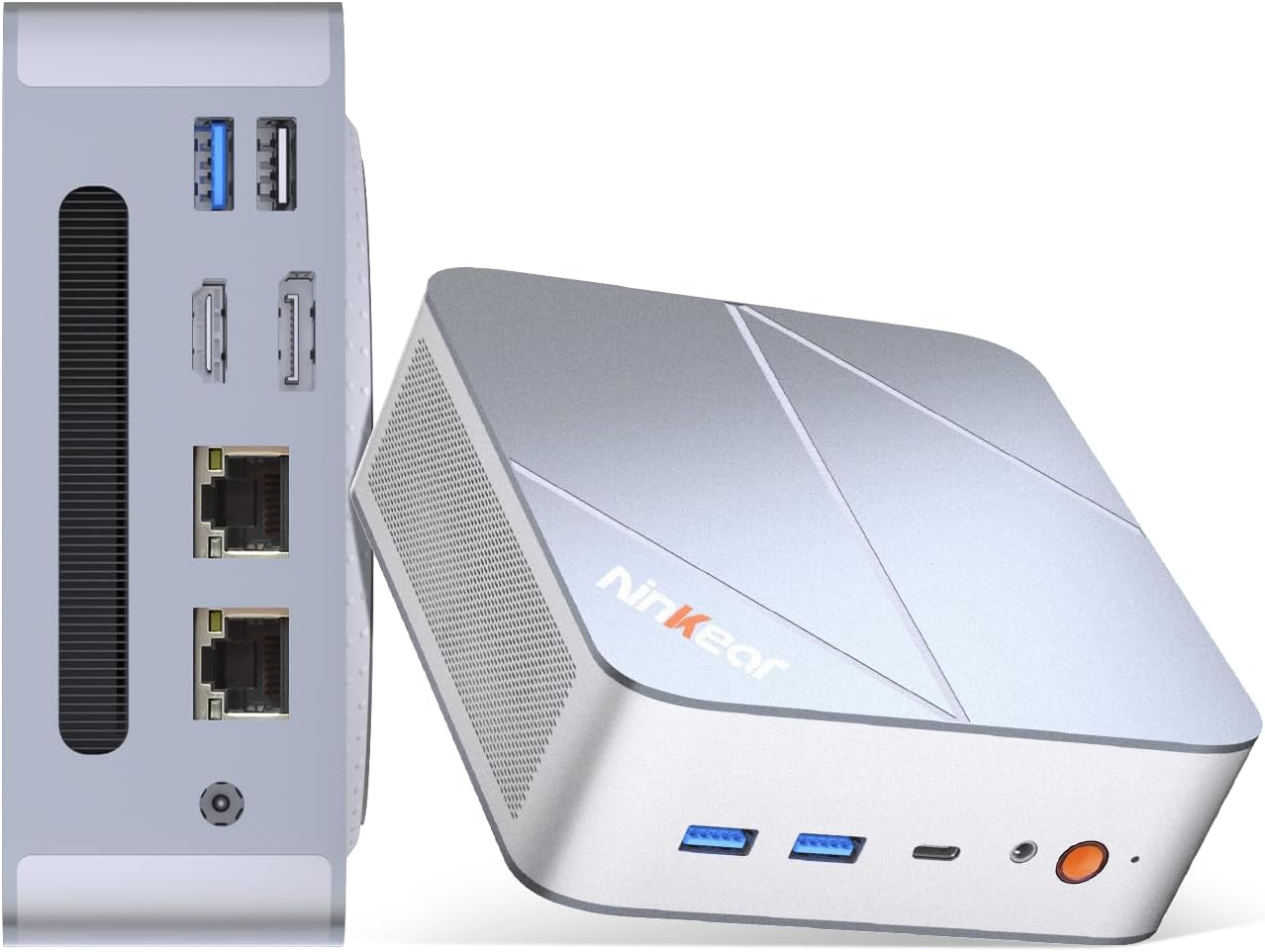
Figure 1.1: Ninkear L12Pro Mini PC - Front and Side View me Porte.
2. Karakteristikat e produkteve
- Lightning-Fast Performance: Powered by Intel’s 12th Gen i9-12900HK processor (14 cores, 20 threads, up to 5.0GHz), capable of handling 4K video editing, coding, and intensive multitasking.
- High-Speed Memory & Storage: Equipped with 32GB DDR4 RAM and an ultra-fast 1TB NVMe SSD for instant file access, smooth application performance, and rapid boot times.
- Triple 8K UHD Display Support: Create an immersive multi-screen setup with HDMI 2.0 (up to 4K@60Hz), DisplayPort 1.4 (up to 8K@60Hz), and USB4/Thunderbolt 4 (up to 8K@60Hz) outputs.
- Dizajn kompakt dhe fleksibël: Small form factor allows for versatile placement behind monitors, under desks, or in backpacks, offering powerful desktop capabilities in a portable size.
- Lidhja e avancuar: Features USB4.0, USB-C, WiFi 6, Bluetooth 5.2, dual 2.5G LAN ports, and multiple USB 3.2 Gen 2 and USB 2.0 ports for comprehensive peripheral support and high-speed data transfer.
- Sistemi efikas i ftohjes: Designed with an all-metal cooling system for quiet and efficient operation, ensuring stable performance even under heavy loads.
- Hapësirë ruajtëse e zgjerueshme: Supports additional M.2 NVMe PCIe SSD (up to 4TB) and an optional 2.5-inch HDD for expanded storage capacity.

Figura 2.1: Karakteristikat dhe Specifikimet Kryesoreview.

Figure 2.2: Triple 8K Display Setup for Enhanced Productivity.

Figure 2.3: Comprehensive Connectivity Options.
3. Çfarë ka në kuti
Pasi ta hapni paketën, sigurohuni që të gjitha sendet e mëposhtme janë të pranishme:
- Ninkear L12Pro Mini PC
- Kabllo HDMI
- Përshtatës i energjisë
- Manuali i Përdoruesit (ky dokument)
4. Udhëzuesi i konfigurimit
Follow these steps to set up your Ninkear L12Pro Mini PC:
- Shpaketojeni Mini PC-në: Hiqni me kujdes Mini PC-në dhe të gjitha aksesorët nga paketimi.
- Lidhu me një ekran:
- Connect one end of the HDMI cable (included) to the HDMI port on the Mini PC and the other end to an available HDMI input on your monitor or TV.
- For DisplayPort or USB4/Thunderbolt 4 connections, use appropriate cables (not included) to connect to compatible displays.
- For triple display setup, connect additional monitors using the available DisplayPort, USB4/Thunderbolt 4, or a USB-C to HDMI/DP adapter (not included).
- Lidhni pajisjet periferike:
- Plug your USB keyboard and mouse into any available USB ports on the Mini PC.
- If using wireless peripherals, ensure their receivers are plugged into a USB port.
- Lidhu me energjinë: Plug the power adapter into the DC-in port on the Mini PC, then plug the other end into a power outlet.
- Lidhja e Rrjetit (Opsionale):
- For a wired connection, connect an Ethernet cable from your router or modem to one of the 2.5G LAN ports on the Mini PC.
- For a wireless connection, the Mini PC supports WiFi 6. You will configure this after the initial boot.
- Nisja Fillestare: Press the power button on the front of the Mini PC. The system will power on and begin the initial setup process for Windows 11 Pro. Follow the on-screen instructions to complete the operating system setup.
5. Udhëzimet e funksionimit
5.1 Ndez/Fik
- Ndezja: Shtypni butonin e energjisë një herë.
- Mbyllni: Klikoni butonin Start në Windows, pastaj zgjidhni Power > Shut down.
- Rinis: Klikoni butonin Start në Windows, pastaj zgjidhni Power > Restart.
- Mbyllje me forcë: If the system is unresponsive, press and hold the power button for approximately 5-7 seconds until the unit powers off. Use this only as a last resort.
5.2 Konfigurimi i ekranit
The Ninkear L12Pro supports up to three independent displays simultaneously. After connecting your monitors, Windows will typically detect them automatically. If not, or to configure display settings:
- Klikoni me të djathtën në një zonë të zbrazët të desktopit tuaj.
- Select "Display settings".
- From here, you can detect displays, arrange them, change resolution, and set display modes (Extend, Duplicate, Second screen only).
5.3 Lidhshmëria e Rrjetit
- Me tel (Ethernet): Ensure an Ethernet cable is connected to one of the 2.5G LAN ports. Windows will automatically establish a connection.
- Pa tel (Wi-Fi):
- Click the Wi-Fi icon in the system tray (bottom right of the taskbar).
- Zgjidhni rrjetin Wi-Fi të dëshiruar nga lista.
- Futni fjalëkalimin e rrjetit nëse ju kërkohet dhe klikoni "Lidhu".
5.4 Lidhja e pajisjeve të jashtme
The Mini PC offers a variety of ports for connecting external devices:
- Portet USB: Use USB 3.2 Gen 2 ports for high-speed devices like external hard drives or SSDs, and USB 2.0 for standard peripherals like keyboards, mice, or printers.
- USB4/Thunderbolt 4: This versatile port supports high-speed data transfer (40Gbps), video output, and power delivery (with compatible devices).
- Xhek audio: Lidhni kufjet ose altoparlantët e jashtëm në prizën audio 3.5 mm.
6. Mirëmbajtja
Proper maintenance ensures the longevity and optimal performance of your Ninkear L12Pro Mini PC:
- Mbajini të pastra ventilat: Ensure the ventilation openings on the Mini PC are not obstructed. Blocked vents can lead to overheating and reduced performance.
- Pastrim i rregullt: Përdorni një leckë të butë dhe të thatë për të pastruar pjesën e jashtme të Mini PC-së. Për pluhurin në vrimat e ventilimit, përdorni ajër të kompresuar. Mos përdorni pastrues të lëngshëm direkt mbi pajisje.
- Përditësimet e softuerit: Regularly update your Windows operating system, drivers, and applications to ensure security, stability, and performance.
- Mbyllja e sigurt: Gjithmonë fikeni Mini PC-në siç duhet përmes sistemit operativ për të parandaluar dëmtimin e të dhënave.
- Kushtet e mjedisit: Operate the Mini PC in a clean, dry environment, away from direct sunlight, excessive heat, and humidity.

Figure 6.1: Smart Cooling System for Quiet Operation.
7. Troubleshooting
If you encounter issues with your Ninkear L12Pro Mini PC, refer to the following common problems and solutions:
| Problem | Shkaku i mundshëm | Zgjidhje |
|---|---|---|
| Nuk ka fuqi | Adaptori i rrymës nuk është i lidhur; Problem me prizën e rrymës; Adaptori i rrymës me defekt. | Ensure power adapter is securely connected to the Mini PC and a working power outlet. Try a different outlet. |
| Nuk ka ekran | Monitor not connected; Incorrect input selected on monitor; Faulty cable; Display driver issue. | Check display cable connections. Ensure monitor is on and set to the correct input source (HDMI, DP, USB-C). Try a different cable or monitor. Update display drivers in Windows. |
| No Internet Connection (Wired) | Ethernet cable disconnected; Router/modem issue; Network driver issue. | Check Ethernet cable connection. Restart your router/modem. Check network adapter settings in Windows Device Manager. |
| Nuk ka lidhje interneti (Wi-Fi) | Wi-Fi disabled; Incorrect password; Router too far; Driver issue. | Ensure Wi-Fi is enabled in Windows. Re-enter Wi-Fi password. Move closer to the router. Update Wi-Fi drivers. |
| Performancë e ngadaltë | Too many applications running; Overheating; Low disk space; Malware. | Close unnecessary applications. Ensure vents are clear. Free up disk space. Run a malware scan. |
8. Specifikimet
Detailed technical specifications for the Ninkear L12Pro Mini PC:
| Veçori | Detaj |
|---|---|
| Markë | Ninkear |
| Numri i modelit | L12Pro |
| Përpunues | Intel Core i9-12900HK (14 Cores, 20 Threads, up to 5.0GHz) |
| RAM | 32GB DDR4 (e zgjerueshme deri në 64GB) |
| Magazinimi | 1TB NVMe SSD (M.2 PCIe 3.0, Expandable up to 4TB) |
| Bashkëprocesor grafik | Grafika Intel Iris Xe (96EU) |
| Rezolucioni maksimal i ekranit | 8K (7680x4320) via DisplayPort/USB4, 4K (4096x2160) via HDMI |
| Daljet video | 1x HDMI 2.0, 1x DisplayPort 1.4, 1x USB4/Thunderbolt 4 |
| Portet USB | 3x USB 3.2 Gen 2, 1x USB 2.0, 1x USB4/Thunderbolt 4 (Type-C) |
| Rrjeti | Dual 2.5G LAN (RJ45), WiFi 6 (802.11ax) |
| Bluetooth | Bluetooth 5.2 |
| Sistemi Operativ | Windows 11 Pro |
| Pesha e artikullit | 2.51 paund (rreth 1.14 kg) |
| Dimensionet | 10.44 x 6.73 x 2.79 inç (Dimensionet e paketës) |
| Ngjyra | Premium Brushed Silver |
9. Garancia dhe Mbështetja
The Ninkear L12Pro Mini PC comes with a standard manufacturer's warranty. For specific warranty terms and conditions, please refer to the documentation included with your purchase or visit the official Ninkear webfaqe.
For technical support, troubleshooting assistance, or any inquiries regarding your product, please contact Ninkear customer service through their official channels.
Ndihma në internet: Vizitoni Dyqani Ninkear në Amazon për pyetje të shpeshta dhe opsione kontakti.


