1. Hyrje
This manual provides detailed instructions for the Loutoc SRC4526 Universal Remote Control, designed for seamless compatibility with Philips Ambilight Smart TVs. Please read this guide thoroughly to ensure optimal use and longevity of your remote control.
1.1 Produkti mbiview
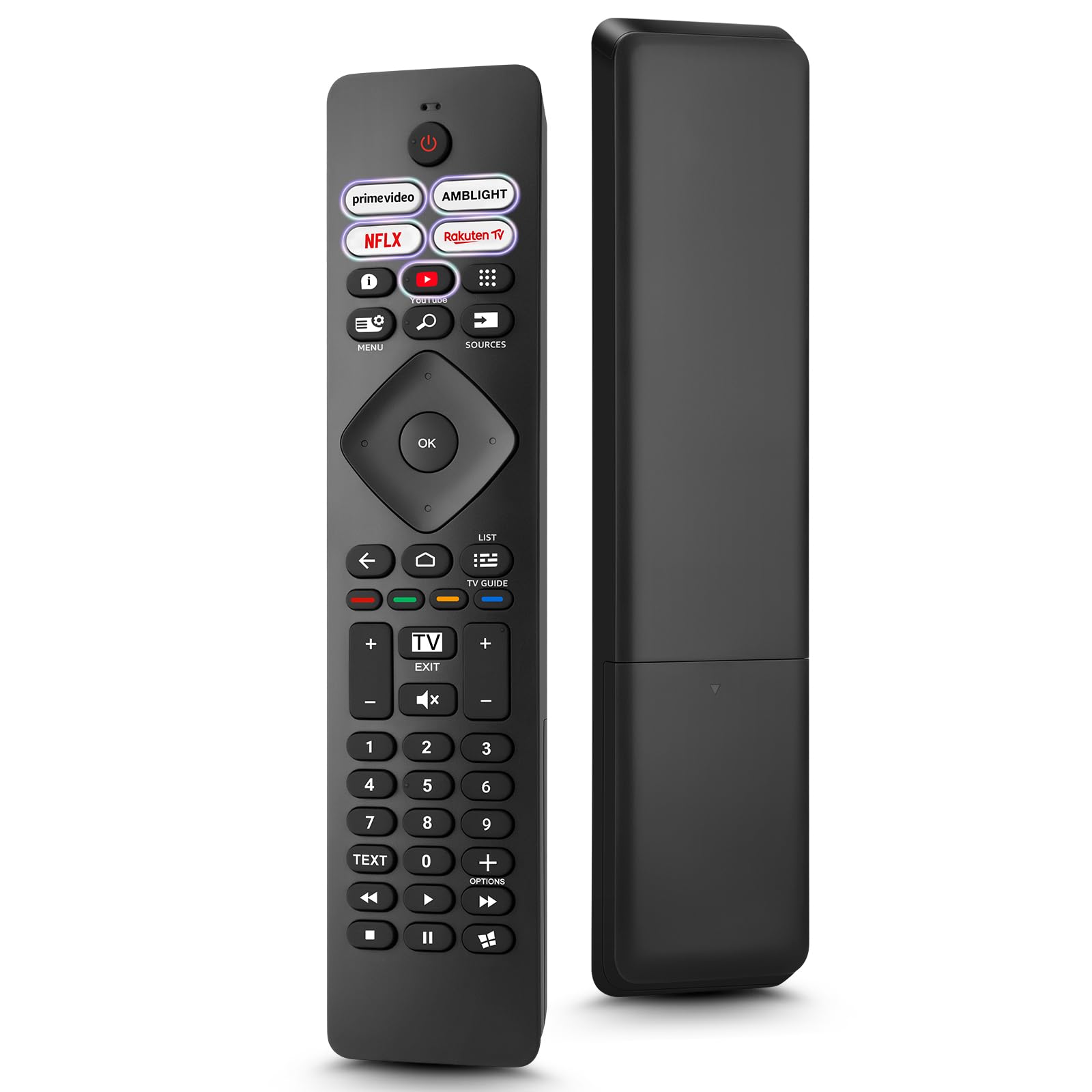
Image: The Loutoc SRC4526 Universal Remote Control, showcasindizajnin e tij ergonomik dhe paraqitjen e butonave.
1.2 Karakteristikat kryesore
- Convenient Plug-and-Play: No complex setup or programming required. Simply insert batteries and the remote is ready for use.
- Përputhshmëria e TV të Gjerë: Fully compatible with Philips Ambilight TVs, including 4K Ambilight LED, OLED, FHD, and Full Ultra HD models.
- Butona të dedikuar për shkurtore: Features 5 direct access buttons for popular streaming platforms: Ambilight, Video, NFLX (Netflix), Rakuten TV, and YouTube.
- Performanca e besueshme: Offers an effective operating range of 8 meters (26 feet) and an ultra-fast response time of 0.2 seconds.
2. Konfigurimi
2.1 Instalimi i baterisë
The Loutoc SRC4526 remote control requires two AAA batteries (not included) for operation.
- Gjeni ndarjen e baterisë në pjesën e pasme të telekomandës.
- Hapeni kapakun e ndarjes së baterisë.
- Vendosni dy bateri AAA, duke u siguruar që terminalet pozitive (+) dhe negative (-) të jenë të vendosura saktë me treguesit brenda ndarjes.
- Mbyllni mirë kapakun e ndarjes së baterisë.
2.2 Përdorimi fillestar
This remote control is designed for immediate use with compatible Philips Ambilight TVs. No programming or pairing is required. Once batteries are installed, point the remote at your TV and begin operation.
3. Udhëzimet e funksionimit
3.1 Funksionet e butonave mbiview
Refer to the image below for a visual guide to the remote control's buttons and their corresponding functions.

Image: Detailed diagram of the Loutoc SRC4526 remote control, illustrating each button and its primary function.
| Butoni | Funksioni |
|---|---|
| Fuqia | Switches the TV on or off (Standby mode). |
| Prime Video, Ambilight, Netflix, Rakuten TV | Quickly launches the corresponding application. |
| Menyja | Opens the Quick Menu with typical TV functions. Hold to show Gaming control bar. |
| Kërko | Opens the Search tab on the Home screen. |
| Burimet | Opens or closes the TV's input sources menu. |
| OK | Confirms a selection or setting. |
| Arrow/Navigation Keys | Navigates up, down, left, or right through menus and options. |
| Mbrapa | Kthehet në ekranin ose kanalin e mëparshëm. |
| Shtëpi | Opens the TV's Home menu. |
| Udhëzues TV | Opens or closes the TV Guide. Long press to open the channel list. |
| Color Keys (Red, Green, Yellow, Blue) | Provides direct selection of on-screen options. The blue key typically opens Help. |
| Vëllimi (+/-) | Rregullon nivelin e volumit të televizorit. |
| Kanali (+/-) | Switches to the next or previous channel. |
| Dilni | Exits current menu/application or returns to live TV. From standby, goes to last viewburimi i botimit. |
| Hesht | Heq ose aktivizon zërin e televizorit. |
| Çelësat me numra (0-9) | Directly selects TV channels. |
| TEKST | Opens or closes Text/Teletext. |
| Kontrollet e riprodhimit | Controls media playback: Play, Pause, Stop, Rewind, Fast Forward. |
| Aplikacionet | Opens the Apps tab on the Home screen. |
3.2 Ambilight Functionality
For Philips TVs equipped with Ambilight functionality, the dedicated Ambilight button on your remote allows you to control the lighting effects.
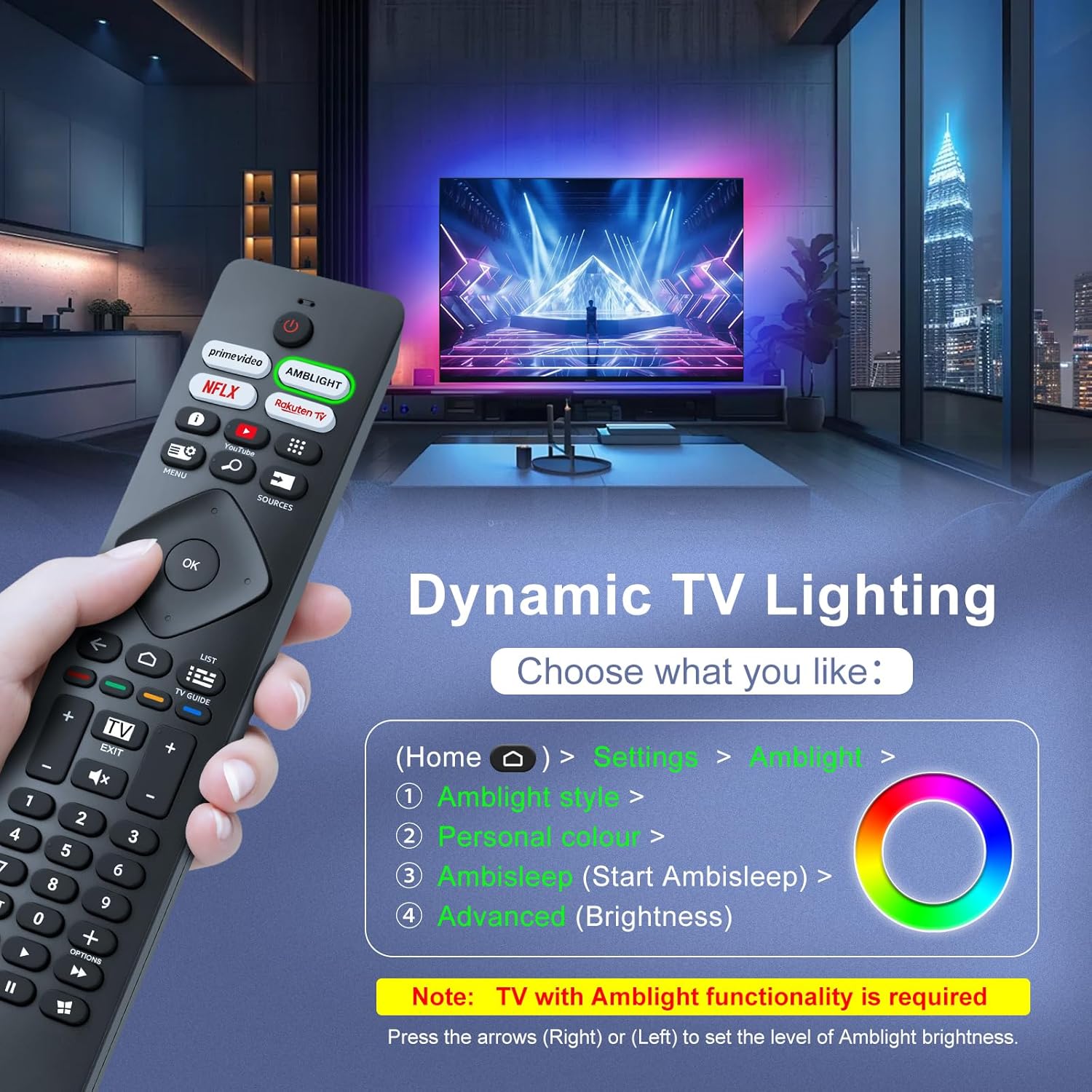
Image: A hand holding the remote control, with an overlay showing Ambilight settings on a TV screen.
After pressing the Ambilight button, you can navigate through the TV's menu to:
- Select different Ambilight display styles.
- Adjust personal color preferences.
- Initiate AmbiSleep mode.
- Adjust Ambilight brightness levels (using the right or left arrow keys).
Note: This feature requires a Philips TV with built-in Ambilight functionality.
4. Mirëmbajtja
4.1 Pastrimi
To clean your remote control, gently wipe it with a soft, dry cloth. Avoid using liquid cleaners, aerosols, or harsh chemicals, as these can damage the remote's surface or internal components.
4.2 Ruajtja
Ruajeni telekomandën në një vend të freskët dhe të thatë, larg rrezeve të diellit dhe temperaturave ekstreme. Nëse telekomanda nuk do të përdoret për një periudhë të gjatë kohore, rekomandohet të hiqni bateritë për të parandaluar rrjedhjet.
4.3 Kujdesi për baterinë
- Zëvendësoni të gjitha bateritë në të njëjtën kohë; mos përzieni bateritë e vjetra dhe të reja.
- Mos përzieni lloje të ndryshme baterish (p.sh., alkaline dhe të rikarikueshme).
- Hidhni bateritë e përdorura me përgjegjësi, sipas rregullave lokale.
5. Troubleshooting
5.1 Çështjet dhe zgjidhjet e përbashkëta
- Telekomanda nuk përgjigjet:
- Kontrolloni nëse bateritë janë futur saktë me polaritetin e saktë.
- Zëvendësoni bateritë me bateri të reja AAA.
- Ensure there are no obstructions between the remote control and the TV's infrared receiver.
- Sigurohuni që jeni brenda rrezes efektive të funksionimit (deri në 8 metra).
- Butona të caktuar që nuk funksionojnë:
- Clean the remote control, especially around the non-functioning buttons, to remove any dirt or debris.
- If only Ambilight functions are not working, ensure your Philips TV model supports Ambilight.
5.2 Kontaktoni Mbështetjen
If you encounter persistent issues that cannot be resolved with the troubleshooting steps above, please contact Loutoc customer support directly. We aim to respond to all inquiries within 12 working hours.
6. Specifikimet
| Veçori | Detaj |
|---|---|
| Markë | Loutoc |
| Emri i modelit | SRC4526-FBA |
| Numri i modelit të artikullit | SRC4526 |
| Ngjyra | E zezë |
| Teknologjia e lidhjes | Infra të kuqe |
| Karakteristika të veçanta | No programming required, Ergonomic, Lightweight |
| Pajisjet e përputhshme | Television (Philips Ambilight TVs) |
| Maximum Number of Supported Devices | 1 |
| Lloji i kontrolluesit | Kontrolli i butonit |
| Gama maksimale | 8 metra (26 këmbë) |
| Përshkrimi i baterisë | AAA (2 required, not included) |
| Prodhuesi | Loutoc |
| Vendi i origjinës | Kinë |
| Data e Parë Disponohet në Amazon.com.be | 31 gusht 2025 |
7. Garancia dhe Mbështetja
7.1 Informacioni i garancisë
This Loutoc remote control comes with a manufacturer's warranty of 30 days from the date of purchase. Please retain your proof of purchase for any warranty claims.
7.2 Mbështetja e klientit
For any questions, technical assistance, or warranty inquiries, please contact Loutoc customer support. We are committed to providing timely assistance and will respond to your queries within 12 working hours.