1. Hyrje
This manual provides essential instructions for the setup, operation, and maintenance of your SPC Zeus 2 Pro Smartphone. Designed for ease of use, this device features a simplified interface, physical buttons, and dedicated support features for seniors. Please read this manual thoroughly to ensure proper usage and to maximize the benefits of your new smartphone.
2. Përmbajtja e paketës
Pasi ta hapni paketën, sigurohuni që të gjitha sendet e mëposhtme të jenë të pranishme:
- SPC Zeus 2 Pro Smartphone
- Baza e karikimit
- Kabllo USB Type-C
- Përshtatës muri
- Mjet për nxjerrjen e tabakasë SIM
- Udhëzues i shpejtë për fillimin (Ky manual)
3. Pajisja Mbaroiview
The SPC Zeus 2 Pro is equipped with a 6.1-inch display and physical buttons for call management, designed for straightforward interaction.

Figura 3.1: Përpara view of the SPC Zeus 2 Pro Smartphone in its charging base, displaying the simplified "Easy Mode" interface with large, clear icons for essential functions. Physical call answer and end buttons are located at the bottom.
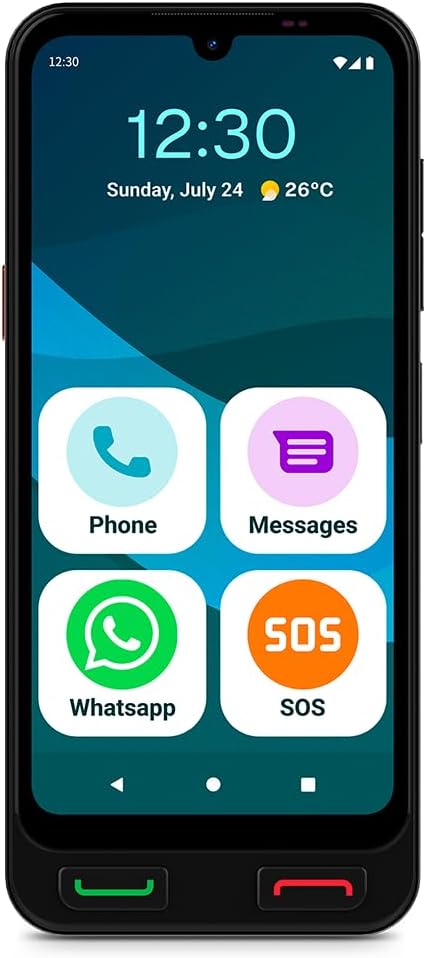
Figura 3.2: Përpara view of the SPC Zeus 2 Pro Smartphone, highlighting the 6.1-inch screen and the "Easy Mode" layout with oversized application icons.
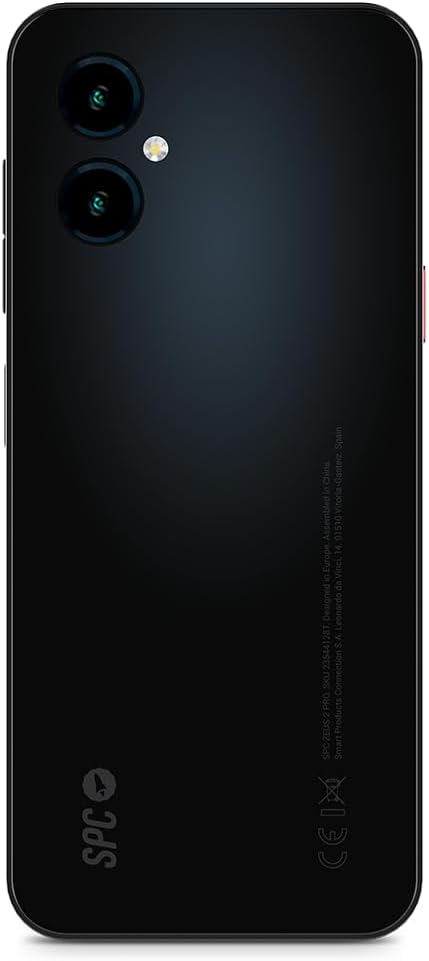
Figura 3.3: E pasme view of the SPC Zeus 2 Pro Smartphone, featuring the dual camera system and the brand's logo.
3.1. Butonat dhe portat fizike
- Butoni i përgjigjes së thirrjes: Green button below the screen to accept incoming calls.
- Butoni i përfundimit të thirrjes: Red button below the screen to end calls or return to the home screen.
- Butoni SOS: Located on the side, for emergency contact activation.
- Butonat e volumit: On the side, to adjust audio levels.
- Butoni i energjisë: On the side, to turn the device on/off or lock/unlock the screen.
- Porta USB Type-C: Për karikimin dhe transferimin e të dhënave.
4. Konfigurimi
4.1. Ndezja dhe Konfigurimi Fillestar
- Shtypni dhe mbani shtypur Butoni i energjisë derisa ekrani të ndriçohet.
- Follow the on-screen start-up assistant. This guide will walk you through initial settings.
- During setup, you can choose between Modaliteti Android (standard smartphone interface) or Modaliteti i lehtë (simplified interface with large icons).
- Adjust icon size and distribution as prompted.
4.2. SIM Card / eSIM Installation
Your SPC Zeus 2 Pro supports Dual SIM functionality and eSIM.
- Gjeni sirtarin e kartës SIM në anën e pajisjes.
- Insert the provided SIM tray ejector tool into the small hole next to the tray and gently push until the tray pops out.
- Place your Nano-SIM card(s) into the designated slots on the tray.
- Vendoseni me kujdes sirtarin në telefon.
- For eSIM activation, follow the instructions provided by your mobile network operator.
4.3. Ngarkimi i pajisjes
The smartphone comes with a convenient charging base.
- Connect the USB Type-C cable to the charging base and the wall adapter.
- Fusni përshtatësin e murit në një prizë elektrike.
- Place the SPC Zeus 2 Pro Smartphone into the charging base. Ensure it is seated correctly and the charging indicator appears on the screen.
- Alternatively, you can connect the USB Type-C cable directly to the phone's charging port.

Figura 4.1: The SPC Zeus 2 Pro Smartphone positioned in its charging base, illustrating the ease of charging without direct cable connection to the phone.
5. Udhëzimet e funksionimit
5.1. Kryerja dhe marrja e thirrjeve
- Për të bërë një telefonatë: In Easy Mode, tap the "Phone" icon or a contact photo. Select the desired contact or dial the number. Press the green physical button to initiate the call.
- Për të marrë një telefonatë: When a call comes in, press the green physical button to answer.
- Për të përfunduar një telefonatë: Press the red physical button to terminate the call.
5.2. Messaging (SMS and WhatsApp)
- SMS: Tap the "Messages" icon to send and receive text messages.
- WhatsApp: Tap the "WhatsApp" icon to access the application for instant messaging and calls.
5.3. Përdorimi i butonit SOS
The dedicated SOS button is designed for emergencies.
- Në rast urgjence, shtypni dhe mbani shtypur butonin Butoni SOS në anën e telefonit.
- The phone will automatically initiate a cycle of calls and SMS messages to pre-configured emergency contacts.
- This cycle will repeat up to three times if no response is received from the emergency contacts.
5.4. SPC Care Application
The SPC Care app allows family members to remotely assist with phone settings and monitor the user's safety.
- Cilësimet në distancë: Family members can rearrange icons, adjust volume, or increase font size from their own smartphone (Android or iOS) via the SPC Care app.
- Vendndodhja në kohë reale: The app provides real-time location tracking, allowing authorized family members to know the user's whereabouts.
- Security Notifications: The SPC Care app can send notifications if the phone has been unused for several hours or if the battery level is low, indicating potential issues.
5.5. Përdorimi i kamerës
The SPC Zeus 2 Pro features a 50 MP rear camera and a 5 MP front camera.
- Tap the Camera icon on the home screen or app drawer to open the camera application.
- Select between the front or rear camera.
- Tap the shutter button to capture photos or record videos.
5.6. Karakteristikat e sigurisë
The device supports fingerprint and facial recognition for secure unlocking.
- Navigoni te Cilësimet > Siguria to set up fingerprint or face unlock.
- Follow the on-screen instructions to register your fingerprint or facial data.
5.7. NFC Payments
The SPC Zeus 2 Pro supports NFC for contactless payments.
- Sigurohuni që NFC është aktivizuar në Cilësimet > Pajisjet e lidhura > Preferencat e lidhjes > NFC.
- Set up your preferred payment application (e.g., Google Pay) and add your payment cards.
- Për të kryer një pagesë, mbajeni pjesën e pasme të telefonit pranë një terminali pagese të pajtueshëm.
6. Mirëmbajtja
6.1. Kujdesi për baterinë
- Shmangni temperaturat ekstreme, të cilat mund të ulin jetëgjatësinë e baterisë.
- Charge the device regularly, preferably using the provided charging base or cable.
- Mos e lini baterinë plotësisht të shkarkuar për periudha të gjata.
6.2. Pastrimi
- Përdorni një leckë të butë pa push për të pastruar ekranin dhe trupin e telefonit.
- Shmangni përdorimin e kimikateve të ashpra ose materialeve gërryese.
- Mbajini portat pa pluhur dhe mbeturina.
7. Troubleshooting
| Problem | Shkaku i mundshëm | Zgjidhje |
|---|---|---|
| Telefoni nuk ndizet | Bateri e ulët ose e varfëruar | Charge the phone using the provided charger and cable/base for at least 30 minutes. |
| Nuk mund të bësh ose të marrësh thirrje | No network signal, SIM card issue, or airplane mode is on. | Check network signal strength. Ensure SIM card is correctly inserted. Turn off airplane mode in settings. Contact your service provider. |
| Ekrani nuk përgjigjet | Probleme me softuerin ose ngrirje e përkohshme. | Restart the phone by holding the power button. If unresponsive, force restart (refer to device specific instructions if available, usually holding power and volume down). |
| SPC Care app notifications not received | App permissions, internet connection, or settings issue. | Ensure the phone has an active internet connection. Check app permissions for notifications. Verify settings within the SPC Care app on both devices. |
8. Specifikimet
| Veçori | Detaj |
|---|---|
| Emri i modelit | ZEUS 2 PRO |
| Numri i modelit | 23544128 T |
| Markë | SPC |
| Sistemi Operativ | Android 15 |
| Madhësia e ekranit | 6.1 inç |
| Rezolucioni | 720 x 1560 |
| Shpejtësia e rifreskimit | 60 Hz |
| RAM | 4 GB |
| Ruajtja e brendshme | 128 GB (Expandable) |
| Shpejtësia e CPU-së | 2.3 GHz (Octa-core) |
| Kamera e pasme | 50 megapikselë |
| Kamera e përparme | 5 megapikselë |
| Përbërja e baterisë | Litium-jon |
| Lidhshmëria | Bluetooth, USB Type C, NFC |
| Karakteristika të veçanta | Dual SIM, Mobile Hotspot, Integrated GPS, Expandable Memory, Fast Charging Support, Fingerprint Unlock, Face Unlock, SOS Button, Charging Base. |
9. Garancia dhe Mbështetja
Your SPC Zeus 2 Pro Smartphone is covered by a standard manufacturer's warranty. Please refer to the warranty card included in your package for specific terms and conditions.
For technical support, troubleshooting assistance, or further inquiries, please visit the official SPC webfaqen e tyre ose kontaktoni departamentin e shërbimit ndaj klientit. Informacioni i kontaktit zakonisht mund të gjendet në paketimin e produktit ose në faqen e prodhuesit. webfaqe.


