1. Hyrje
Faleminderit për blerjenasing the LG 43-Inch Class QNED AI 4K Smart TV. This manual provides essential information for the safe and efficient operation of your television. Please read it thoroughly before use and keep it for future reference.
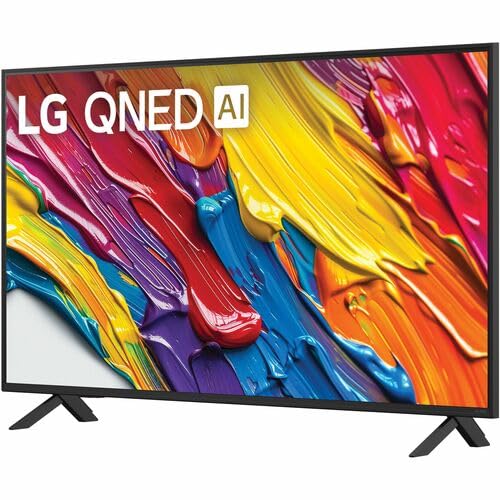
The LG QNED AI 4K TV offers vivid, immersive color with its wide color gamut technology, enhanced by the α7 AI Processor Gen8. It intelligently optimizes picture and sound based on content. Powered by LG webOS 24, it provides a streamlined streaming experience with customizable Quick Cards and the Magic Remote. Enjoy virtual 5.1 surround sound, FILMMAKER MODE, and advanced gaming features like FreeSync, VRR, and GeForce NOW.
2. Informacion mbi sigurinë
Ndiqni gjithmonë masat themelore të sigurisë kur përdorni këtë produkt për të zvogëluar rrezikun e zjarrit, goditjes elektrike ose lëndimit.
- Mos e ekspozoni televizorin ndaj shiut ose lagështisë.
- Mos e hapni televizorin casing; ia drejtoni të gjitha shërbimet personelit të kualifikuar.
- Siguroni ventilim të duhur dhe mos bllokoni hapjet e ventilimit.
- Përdorni vetëm kabllon e energjisë që vjen me televizorin.
- Mbajeni televizorin larg burimeve të nxehtësisë dhe rrezeve të diellit direkte.
- Avoid placing heavy objects on the power cord or TV.
3. Çfarë ka në kuti
Verifikoni që të gjithë përbërësit janë të pranishëm:
- LG 43-Inch Class QNED AI 4K Smart TV
- Kabllo energjie
- Telekomandë (përfshihen 2 bateri AAA)
- Komponentët e qëndrimit
- Manuali i Përdoruesit (ky dokument)
4. Konfigurimi
4.1 Ngjitja e stendës
Vendoseni me kujdes televizorin me ekran poshtë mbi një sipërfaqe të butë dhe të sheshtë. Bashkangjitni pjesët e mbështetëses në vendet e caktuara në pjesën e poshtme të televizorit duke përdorur vidat e dhëna. Sigurohuni që mbështetësja të jetë e fiksuar mirë përpara se ta vendosni televizorin drejt.
Imazh: Pjesa e pasme view of the LG 43QNED82AUA TV with its stand.
4.2 Montimi në Mur (Opsional)
This TV supports VESA mount standard 200 x 200 mm. For wall mounting, remove the stand and use a compatible wall mount bracket (sold separately). Follow the instructions provided with your wall mount.
4.3 Lidhja e pajisjeve
Connect your external devices (cable box, Blu-ray player, gaming console, etc.) to the appropriate ports on the TV. The TV features 3 HDMI ports, 1 USB port, Ethernet, and S/PDIF (Optical) for audio output.

Image: Connectivity ports on the back of the LG 43QNED82AUA TV.
4.4 Aktivizimi
Plug the power cable into the TV and then into a wall outlet. Press the power button on the remote control or on the TV to turn it on. Follow the on-screen instructions for initial setup, including network connection and channel scanning.
5. Përdorimi i televizorit
5.1 Telekomanda
The included Magic Remote allows for intuitive control with point-and-click functionality, voice commands, and a scroll wheel. Insert the two AAA batteries (included) into the remote control.
5.2 WebPlatforma Inteligjente OS 24
Televizori juaj punon me LG webOS 24 operating system. Navigate through apps, settings, and inputs using the customizable Quick Cards. Access popular streaming services like Netflix, Prime Video, Disney Plus, HBO Max, and Apple TV directly from the home screen.
5.3 Cilësimet e figurës dhe zërit
Access the settings menu to adjust picture modes (e.g., Standard, Vivid, Cinema, Filmmaker Mode) and sound modes (e.g., AI Sound Pro, Standard, Cinema). The α7 AI Processor Gen8 automatically optimizes these settings based on the content being viewed.

Image: Dynamic QNED Color representation.
6. Smart Features and AI
6.1 AI Picture and Sound
The α7 AI Processor Gen8 enhances brightness, improves sound, and refines picture detail with 4K upscaling and Dynamic Tone Mapping. AI Sound Pro provides virtual 5.1 surround sound, and WOW Orchestra integrates TV speakers with compatible LG soundbars for an enhanced audio experience.
6.2 Voice Assistance and AI Search
Your TV has Alexa Built-in. Press the Alexa button on your remote to activate voice commands. Utilize AI Kërko për personalized recommendations and to find content quickly. The TV also supports Google Assistant, Apple AirPlay 2, and Google Cast for seamless integration with your smart home ecosystem.

Image: LG AI Search interface.
7. Karakteristikat e Lojërave
The LG QNED AI 4K TV is designed for an optimal gaming experience with a 60 Hz native refresh rate, which can be boosted up to 144 Hz with VRR (Variable Refresh Rate) enabled. It supports FreeSync and features LG Game Optimizer and Game Dashboard for quick access to gaming settings.
- FreeSync dhe VRR: Zvogëlon grisjen dhe ngecjen e ekranit për një lojë më të qetë.
- Optimizuesi i Lojërave dhe Paneli i Kontrollit: Centralized hub for adjusting game settings, including genre-specific picture modes.
- Lojëra në renë kompjuterike: Access GeForce NOW and Xbox Cloud Gaming (subscriptions and compatible controllers required).
- ALLM (Modaliteti automatik i vonesës së ulët): Automatically switches to a low-latency mode when a game console is detected.

Image: Gaming experience on the LG 43QNED82AUA TV.
8. Lidhshmëria
Your LG QNED AI 4K Smart TV offers a variety of connectivity options:
- HDMI: 3 ports for connecting external devices.
- USB: 1 portë për riprodhimin e mediave ose lidhjen e pajisjeve USB.
- Ethernet: Për lidhje interneti me kabëll.
- Wi-Fi: Built-in for wireless internet access.
- Bluetooth 5.0: Për lidhjen e kufjeve pa tel, soundbar-eve ose pajisjeve të tjera Bluetooth.
- Optik (S/PDIF): Për dalje dixhitale audio në sisteme zanore.
- Ekran pasqyre: Supports AirPlay 2 and Google Cast for casting content from mobile devices.
9. Mirëmbajtja
9.1 Pastrimi i televizorit
Unplug the TV before cleaning. Use a soft, dry cloth to wipe the screen and exterior. For stubborn marks, lightly dampLani leckën me ujë ose me një pastrues të specializuar për ekranin. Shmangni përdorimin e kimikateve të ashpra ose materialeve gërryese.
9.2 Përditësimet e softuerit
Ensure your TV's software is up to date for optimal performance and new features. Software updates auto-download when connected to the internet. If "auto-update" is disabled, you will receive a prompt to update manually.
10. Troubleshooting
Nëse hasni probleme me televizorin tuaj, referojuni zgjidhjeve të zakonshme të mëposhtme:
| Problem | Zgjidhje |
|---|---|
| Asnjë fuqi | Check power cable connection, wall outlet, and remote batteries. |
| Nuk ka imazh, por ka zë | Verify input source, check cable connections, try a different HDMI port. |
| Nuk ka zë, por imazhi është i pranishëm | Check volume, mute status, audio output settings, and external audio device connections. |
| Telekomanda nuk funksionon | Replace batteries, ensure no obstructions between remote and TV, re-pair Magic Remote if necessary. |
| Cilësi e dobët e figurës | Adjust picture settings, check source resolution, ensure strong signal for broadcast channels. |
| Nuk mund të lidhet me Wi-Fi | Restart router, check Wi-Fi password, ensure TV is within range, try wired Ethernet connection. |
For further assistance, please refer to the full electronic manual available on the LG support webfaqe interneti ose kontaktoni mbështetjen e klientëve të LG.
11. Specifikimet
| Veçori | Detaj |
|---|---|
| Madhësia e ekranit | 43 inç |
| Teknologjia e shfaqjes | LED (QNED) |
| Rezolucioni | 4K (3840 x 2160) |
| Shpejtësia e rifreskimit | 60 Hz (Native), up to 144 Hz (VRR) |
| Përpunues | a7 Procesori AI Gen8 |
| Mbështetje HDR | HDR10, HLG |
| Sistemi Operativ | webOS 24 |
| Lidhshmëria | Wi-Fi, Bluetooth 5.0, Ethernet, 3x HDMI, 1x USB, Optical (S/PDIF) |
| Asistentët e zërit | Alexa Built-in, Google Assistant compatible |
| Dimensionet (me stendë) | 10.1"D x 38.1"L x 25"H |
| Pesha (pa qëndrim) | 20.7 paund |
| Standardi i Montimit VESA | 200 x 200 mm |
| Konsumi i energjisë | 82 Watts |
| Konsumi Vjetor i Energjisë | 152 kilovat orë në vit |

Image: LG 43QNED82AUA TV dimensions.
12. Garancia dhe Mbështetja
12.1 Informacioni i garancisë
This LG TV comes with a 1 Year Parts & Labor Limited Warranty. Please retain your proof of purchase for warranty claims. For full warranty terms and conditions, refer to the warranty card included with your product or visit the official LG webfaqe.
12.2 Mbështetja e klientit
For technical support, product registration, or service inquiries, please visit the LG support website or contact their customer service hotline. Contact information can be found on the LG official webfaqja e internetit ose në dokumentacionin e dhënë me televizorin tuaj.