Hyrje
This manual provides essential information for the safe and efficient operation of your AOC XL2-211 Smart Projector. Please read it thoroughly before using the device and retain it for future reference.
The AOC XL2-211 is a portable 1080P Full HD smart projector featuring Android 12.0, Wi-Fi 6, Bluetooth 5.0, and a fully enclosed optical engine for dust protection. It offers a large projection screen size from 40 to 250 inches, integrated stereo speakers, and versatile connectivity options.
Informacioni i Sigurisë
Ndiqni masat paraprake të sigurisë për të parandaluar dëmtimin e projektorit dhe për të siguruar sigurinë e përdoruesit:
- Mos shikoni drejtpërdrejt në lentet e projektorit kur lamp është ndezur.
- Siguroni ventilimin e duhur për të parandaluar mbinxehjen. Mos bllokoni hapjet e ventilimit.
- Përdorni vetëm adaptorin e energjisë që vjen me projektorin.
- Mbajeni projektorin larg ujit ose lëngjeve të tjera.
- Mos u përpiqni ta çmontoni ose riparoni vetë projektorin. Kontaktoni personelin e kualifikuar të shërbimit.
- Vendoseni projektorin në një sipërfaqe të qëndrueshme dhe të niveluar.
Përmbajtja e paketës
Verifikoni që të gjitha sendet janë të pranishme në paketim:
- AOC XL2-211 Smart Projector
- Kabllo energjie
- Kabllo HDMI
- Telekomandë
- Manuali i Përdoruesit (ky dokument)

Image: The AOC XL2-211 Smart Projector and its included accessories, including the power cable, HDMI cable, and remote control.
Produkti Mbiview
Komponentët e projektorit
Njihuni me përbërësit kryesorë të projektorit tuaj:
- Lentet e projektimit: Emeton imazhin.
- Butoni i energjisë: Ndez/fik projektorin.
- Sensori i Fokusit: Used for automatic focus adjustment.
- Grilat e ventilimit: Siguroni rrjedhën e duhur të ajrit për ftohje.
- Portet e hyrjes: HDMI, USB, Audio Out (3.5mm jack).
- Fuqia hyrëse: Lidhet me kabllon e energjisë.

Imazh: Pjesa e pasme view of the AOC XL2-211 projector, highlighting the HDMI, USB, and power input ports.
Konfigurimi
1. Lidhja e energjisë
- Lidhni kabllon e energjisë me portën e hyrjes së energjisë të projektorit.
- Lidhni anën tjetër të kabllit të energjisë në një prizë muri.
2. Vendosja Fillestare
- Place the projector on a stable surface or mount it on a tripod (not included).
- Ensure the projection surface is flat and clear of obstructions.
- The projector supports flexible placement, including tabletop and tripod mounting.
3. Ndezja/Fikur
- Shtypni butonin e ndezjes në projektor ose në telekomandë për ta ndezur.
- Shtypni dhe mbani shtypur butonin e energjisë për ta fikur.
4. Korrigjimi i Fokusit dhe i Keystone-it
The projector features automatic focus and keystone correction for a clear, rectangular image.
- Fokusi automatik: The projector will automatically adjust the focus upon startup or movement. You can enable/disable this in the settings.
- Korrigjimi automatik i gurit kryesor: The projector automatically corrects image distortion caused by angled projection. This can also be adjusted in settings.
- Rregullimi manual: For fine-tuning, manual focus and keystone correction options are available in the Projection Settings menu.

Image: The AOC XL2-211 projector displaying its intelligent auto-focus and keystone correction capabilities, ensuring a clear image from various angles.
Udhëzimet e funksionimit
1. Navigimi dhe Ndërfaqja
The projector runs on Android 12.0, providing a user-friendly interface. Use the remote control to navigate through menus and select options.
- Ekrani bazë: Access installed applications, settings, and media sources.
- Menyja e cilësimeve: Adjust network, Bluetooth, projection, language, and other system settings.
2. Opsionet e lidhjes
The projector offers multiple ways to connect and display content:
Wireless Connectivity (Wi-Fi 6 & Bluetooth 5.0)
- Wi-Fi: Connect to your home network for internet access and streaming. Navigate to Cilësimet > Wireless për t'u lidhur.
- Ekran pasqyre: Wirelessly cast content from your smartphone (iPhone, Android) or tablet. Ensure both devices are on the same Wi-Fi network.
- Bluetooth: Connect external Bluetooth speakers or headphones for enhanced audio. Go to Cilësimet > Bluetooth për të çiftuar pajisjet.

Image: The AOC XL2-211 projector displaying content mirrored from a smartphone, illustrating seamless wireless sharing.
Lidhje me tela
- HDMI: Connect devices like laptops, gaming consoles, or TV decoders using an HDMI cable.
- USB: Lidhni disqet USB për të luajtur media files direkt.
- Dalja e audios (jack 3.5 mm): Lidhni kufje me tela ose altoparlantë të jashtëm.
Imazh: Një i detajuar view of the AOC XL2-211 projector's input panel, showing HDMI, USB, and audio ports for versatile connections.
3. Luajtja e medias
The projector supports various media formats and streaming applications.
- Aplikacionet e transmetimit: Access pre-installed apps like Netflix, Hulu, Disney+, Prime Video, and YouTube.
- Mediat lokale: Play videos, photos, and music from a connected USB drive.
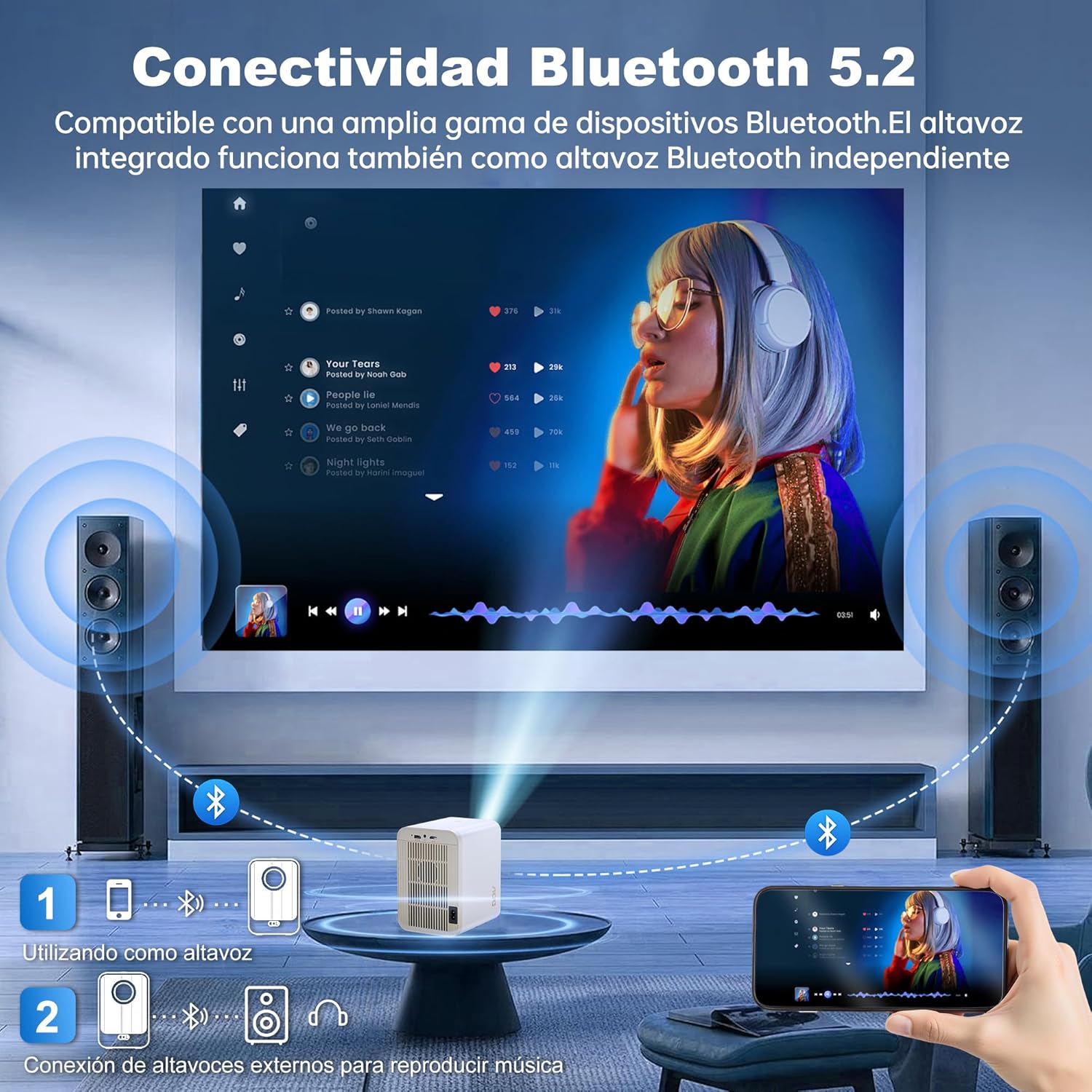
Image: The AOC XL2-211 projector displaying its smart interface with various streaming applications, ready for entertainment.
4. Dalje audio
The projector includes built-in 2x12W stereo speakers. For alternative audio experiences:
- Connect Bluetooth speakers or headphones via Cilësimet > Bluetooth.
- Use the 3.5mm audio jack for wired external speakers or headphones.

Image: The AOC XL2-211 projector wirelessly connected to external Bluetooth speakers, demonstrating enhanced audio capabilities.
Mirëmbajtja
1. Pastrimi i projektorit
- Sigurohuni që projektori të jetë i fikur dhe i shkëputur nga priza para se ta pastroni.
- Përdorni një leckë të butë dhe të thatë për të fshirë pjesën e jashtme të projektorit.
- For the lens, use a lens cleaning cloth and specialized lens cleaning solution. Do not use abrasive materials.
- The fully enclosed optical engine minimizes dust accumulation, but regular external cleaning is recommended.
2. Magazinimi
- Store the projector in a cool, dry place away from direct sunlight and extreme temperatures.
- If storing for an extended period, place it back in its original packaging or a protective case.
Zgjidhja e problemeve
| Problem | Shkaku i mundshëm | Zgjidhje |
|---|---|---|
| Asnjë imazh nuk shfaqet | Power cable disconnected, incorrect input source, lens cap on. | Kontrolloni lidhjen e energjisë, zgjidhni burimin e saktë të hyrjes (HDMI/USB), hiqni kapakun e lentes. |
| Imazhi është i paqartë | Jashtë fokusit, korrigjim i gabuar i çelësit bazë. | Allow auto-focus to adjust, or manually adjust focus/keystone in Projection Settings. |
| Asnjë zë | Volume too low, external audio device not connected/paired, internal speakers disabled. | Increase volume, ensure Bluetooth device is paired or wired audio is connected, check audio settings. |
| Nuk mund të lidhet me Wi-Fi/Bluetooth | Incorrect password, device too far, interference. | Verify password, move device closer to router/projector, restart devices. |
| Telekomanda nuk funksionon | Low batteries, obstruction. | Replace batteries, ensure no obstruction between remote and projector. |
Specifikimet
| Veçori | Detaj |
|---|---|
| Markë | AOC |
| Numri i modelit | XL2-211 |
| Rezoluta amtare | 1280 x 800 piksele |
| Rezolucioni i mbështetur | 1920 x 1080 piksele (Full HD) |
| Shkëlqimi | 12000 Lumens (300 ANSI) |
| Raporti i kontrastit | 12000:1 |
| Sistemi Operativ | Android 12.0 |
| RAM | 1 GB |
| ROM | 8 GB |
| Lidhja me valë | Wi-Fi 6 (2.4G/5G), Bluetooth 5.0 |
| Portat hyrëse | HDMI, USB, Audio (3.5mm jack), TF Card |
| Portat e daljes | Audio (3.5mm jack) |
| Folësi | Built-in 2x12W Stereo Speakers |
| Madhësia e projeksionit | 40-250 inç |
| Faktori i formës | Portativ |
| Dimensionet e produktit | 19 x 21 x 26 cm |
| Pesha e artikullit | 750 gram |
| Konsumi i energjisë | 40 vat |
Garancia dhe Mbështetja
Informacioni i Garancisë
Your AOC XL2-211 Smart Projector comes with a një vit garanci nga data e blerjes, duke mbuluar defektet e prodhimit. Ju lutemi ruani provën e blerjes për kërkesat e garancisë.
Mbështetja e klientit
For technical assistance, troubleshooting, or warranty inquiries, please contact AOC customer support. Refer to the official AOC webfaqe interneti për informacionin më të azhurnuar të kontaktit.
Burimet në internet: Vizitoni AOC Brand Store for additional product information and FAQs.
Video Demonstrimi
Watch this official video for a visual guide on setting up and using your AOC XL2-211 Smart Projector, including unboxing, connectivity, and key features.
Video: An official demonstration of the AOC XL2-211 Smart Projector, showcasing its unboxing, setup, and various functionalities.


