1. Hyrje
This manual provides detailed instructions for the LAUNCH Creader Elite V3.0 OBD2 Scanner, a professional diagnostic tool designed specifically for Land Rover and Jaguar vehicles. It covers device setup, operational procedures for various diagnostic and service functions, software updates, and troubleshooting tips. Please read this manual thoroughly before operating the device to ensure correct usage and optimal performance.
2. Produkti i Mbaruarview
2.1. Çfarë ka në kuti
- 1 * LAUNCH Creader Elite V3.0 OBD2 Scanner for JLR
- 1 * OBD2 Diagnostic Cable
- 1 * Udhëzues për fillimin e shpejtë
- 1 * Manuali i përdoruesit
2.2. Karakteristikat kryesore
The LAUNCH Creader Elite V3.0 offers a comprehensive suite of features for vehicle diagnostics and maintenance:
- Pajisje të Përmirësuara: Features Android 8.1 operating system, 32GB ROM, 3000mAh battery, and 2.4&5GHz dual-band Wi-Fi for improved performance.
- DoIP Protocol Support: Supports the new DoIP protocol for Land Rover & Jaguar models manufactured after 2017 (requires an adapter).
- Full Systems Diagnostics: Provides in-depth scanning for all available vehicle modules, including engine, transmission, ABS, SRS, and more.
- Bi-Directional Control (Active Test): Allows control of vehicle components and systems for active testing, such as windows, mirrors, wipers, and horn.
- Comprehensive Service Functions: Includes Oil Reset, Electronic Parking Brake (EPB) Reset, Battery Management System (BMS) Reset, Steering Angle Sensor (SAS) Calibration, Injector Coding, Throttle Relearn, Height Calibration, Transmission Adaptation, Crankshaft/Camshaft Relearn, Sunroof Calibration, and more.
- 4-in-1 Live Data Stream: Displays real-time data from multiple sensors simultaneously in a graphical format, with recording and playback capabilities.
- Smart Diagnostic Functions: Features Auto VIN for automatic vehicle identification, DTC Lookup for code explanations, and the ability to generate and share diagnostic reports.
- Funksionet e plota të OBD2: Supports all 10 OBD2 test modes for universal vehicle compatibility (post-1996 models).
- Përditësime falas për gjithë jetën: Provides lifetime free software updates specifically for Land Rover and Jaguar vehicle brands.
2.3. Krahasimi i pajisjes
The Creader Elite V3.0 offers significant upgrades over previous versions:

Image: Comparison of Creader Elite V3.0, V2.0, and V1.0, highlighting V3.0's superior features like DoIP, Android 8.1, 32GB memory, and 2.4&5GHz WiFi.
2.4. Përshkrimi fizik
The device features a durable orange casing with a 4-inch touchscreen display. The back of the device includes product identification details such as the model number, FCC ID, and serial number.
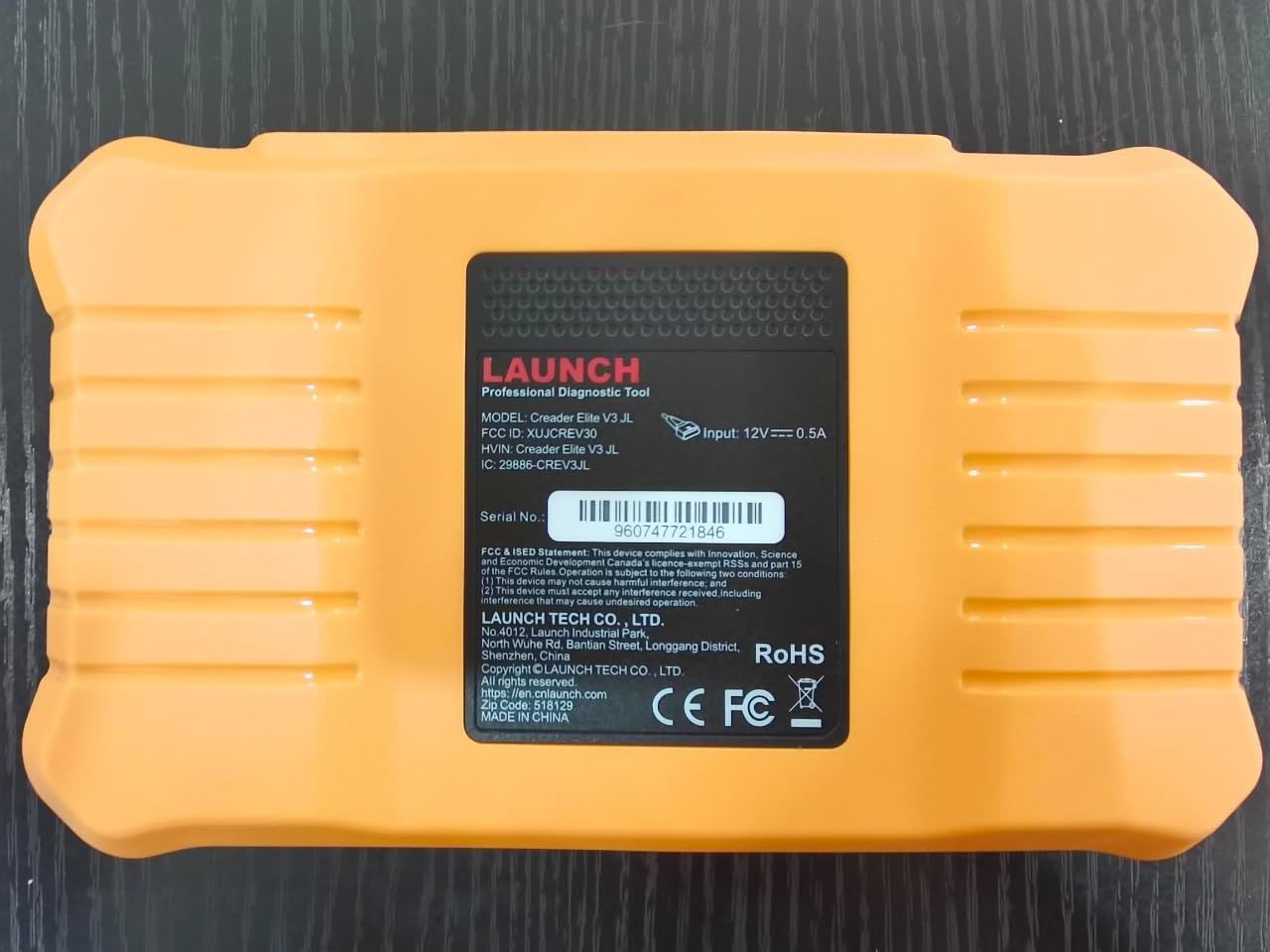
Imazh: Pjesa e pasme view of the LAUNCH Creader Elite V3.0, displaying the model number, FCC ID, and serial number (e.g., 960747721846).
3. Konfigurimi
3.1. Ndezja fillestare
- Sigurohuni që pajisja të jetë plotësisht e ngarkuar ose e lidhur me një burim energjie.
- Shtypni dhe mbani shtypur butonin e ndezjes derisa ekrani të ndriçohet.
- Ndiqni udhëzimet në ekran për të zgjedhur gjuhën dhe rajonin tuaj të preferuar.
3.2. Lidhja Wi-Fi
- Nga menyja kryesore, shkoni te Cilësimet.
- Zgjidhni Wi-Fi dhe ndizeni.
- Zgjidhni rrjetin Wi-Fi të dëshiruar nga lista dhe futni fjalëkalimin nëse ju kërkohet.
- Confirm the connection. A stable internet connection is required for software updates and online resources.
3.3. Regjistrimi dhe Aktivizimi
Upon first use or after a factory reset, you may be prompted to register your device. Follow the on-screen instructions to create an account or log in. This step is crucial for accessing software updates and technical support.
4. Udhëzimet e funksionimit
4.1. Lidhja me automjetin
- Locate the vehicle's OBD2 diagnostic port, typically under the dashboard on the driver's side.
- Ensure the vehicle's ignition is in the ON position (engine off or running, depending on the test).
- Connect the OBD2 diagnostic cable to the vehicle's OBD2 port and to the LAUNCH Creader Elite V3.0 device.
- The device will automatically power on or prompt you to do so.
4.2. Full Systems Diagnostics
This function allows you to scan all available electronic control units (ECUs) in the vehicle.

Image: Display showing OE-level all system diagnostics, including Auto VIN, fault codes, 4-in-1 live data, and MIL reset.
- Nga menyja kryesore, zgjidhni Diagnoza lokale.
- Choose the vehicle brand (Land Rover or Jaguar).
- Zgjidhni Kërkimi automatik or Përzgjedhja manuale. Auto Search (Auto VIN) will attempt to automatically identify the vehicle.
- Once the vehicle is identified, select Raport Shëndetësor or Skanimi i sistemit to perform a comprehensive scan of all modules.
- Review the diagnostic trouble codes (DTCs) and ECU information. You can then choose to clear codes if necessary.
4.3. Funksionet e Shërbimit
The Creader Elite V3.0 provides numerous maintenance and reset services. Access these functions via Diagnose > Brand > System Selection > Special Function.

Imazh: Mbiview of various service functions including Oil Reset, Brake Reset, SAS Calibration, Start-Stop Reset, TPMS Reset, Injector Coding, Battery Reset, ABS Bleeding, Seat Calibration, and Height Calibration.
Common services include:
- Rivendosja e vajit: Resets the engine oil life system.
- Rivendosja e EPB-së: Resets the electronic parking brake after replacement.
- Kalibrimi SAS: Kalibron sensorin e këndit të drejtimit.
- Kodimi i Injektorit: Codes new injector numbers into the ECU.
- Rimësimi i gazit: Rimëson pozicionin e trupit të gazit.
- Kalibrimi i lartësisë: Calibrates the vehicle's suspension height.
- Rivendosja e baterisë: Registers a new battery replacement.
- Gjakderdhje nga ABS: Performs ABS brake bleeding procedures.
Note: The availability of specific service functions may vary depending on the vehicle model and year. Always check compatibility before performing a service.
4.4. Bi-Directional Control (Active Tests)
Active tests allow you to send commands to vehicle systems and components to verify their functionality.

Image: Depicts bi-directional active tests, showing the device sending commands to vehicle actuators like wipers, windows, clutch, and injectors to check their status.
- Navigate to the desired vehicle system within the diagnostic menu.
- Zgjidhni Test aktiv or Bi-Directional Control.
- Choose the specific component or system you wish to test (e.g., 'Wiper Test', 'Window Test', 'Horn Test').
- Ndiqni udhëzimet në ekran për të aktivizuar dhe vëzhguar përgjigjen e komponentit.
4.5. Funksionet e plota të OBD2
For universal vehicle diagnostics (all OBD2 compliant vehicles after 1996), use the OBD II opsioni i menysë.
- Kodet e leximit: Retrieves generic (P0, P2, P3, U0) and manufacturer specific (P1, P3, U1) codes.
- Kodet e qarta: Clears diagnostic trouble codes and turns off the Malfunction Indicator Light (MIL).
- Të dhëna të drejtpërdrejta: Shfaq rrjedhën e të dhënave në kohë reale nga sensorët e automjetit.
- Gatishmëria I/M: Kontrollon gatishmërinë e monitorëve që lidhen me emetimet.
- Korniza e ngrirjes: Displays a snapshot of operating conditions at the time of an emission-related fault.
- Testi i sensorit O2: Marr rezultatet e testit të monitorit të sensorit të O2.
- On-Board Monitor Test (Mode 6): Nxjerr rezultatet për komponentët dhe sistemet e sistemit të fuqisë që lidhen me emetimet.
- EVAP System Test (Mode 8): Fillon një test të sistemit të kontrollit të emetimeve avulluese.
- Informacioni i automjetit: Gjen numrin e identifikimit të automjetit (VIN), ID-në e kalibrimit (CALID) dhe numrin e verifikimit të kalibrimit (CVN).
4.6. Real-Time Monitoring and Data Stream
Monitor various vehicle parameters in real-time to diagnose intermittent issues or verify repairs.

Image: Real-time monitoring screen showing battery voltage, transmission oil temperature, coolant temperature, and vehicle speed, with a detailed 4-in-1 data stream graph below.
- Nga menyja diagnostikuese, zgjidhni Të dhëna të drejtpërdrejta.
- Choose the parameters you wish to monitor.
- The device can display up to four data streams simultaneously in a graphical format.
- Përdorni Regjistro dhe Riprodhimi functions to capture and review data for later analysis.
4.7. Smart Diagnostic Features
The device includes features to streamline the diagnostic process:
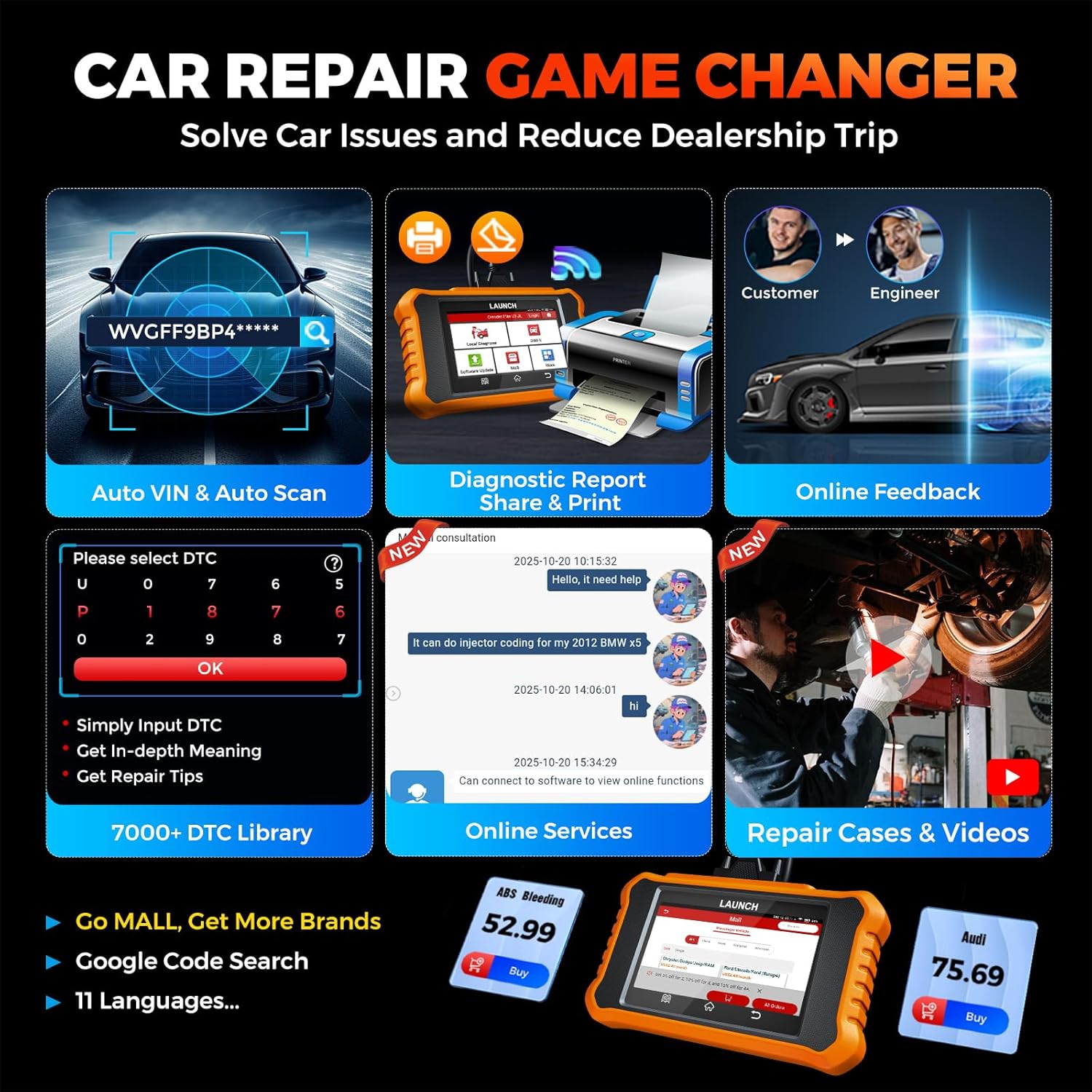
Image: Smart diagnostic features such as Auto VIN, diagnostic report generation and printing, online feedback, 7000+ DTC library, and access to online services.
- Numri i identifikimit automatik i identifikimit (VIN): Automatically identifies vehicle information (year, make, model) for quicker diagnostics.
- Kërkimi i DTC: Provides detailed explanations for diagnostic trouble codes.
- Raporti Diagnostikues: Generates a professional diagnostic report that can be shared or printed.
- Reagime Online: Allows users to submit feedback or issues directly to technical support.
5. Mirëmbajtja dhe Përditësimet
5.1. Përditësimet e softuerit
The LAUNCH Creader Elite V3.0 offers lifetime free software updates for Land Rover and Jaguar brands.
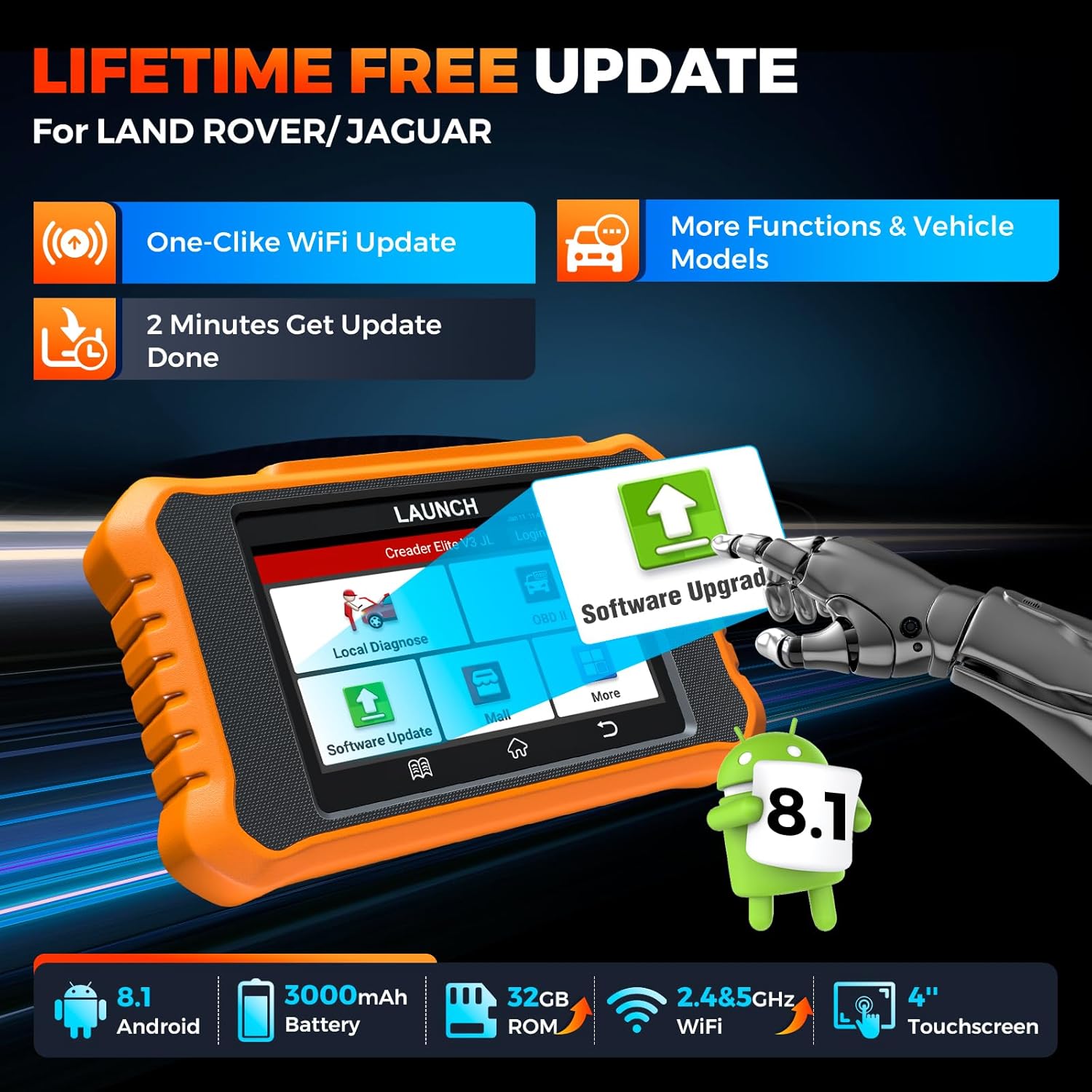
Image: Device screen illustrating the one-click Wi-Fi update process, emphasizing lifetime free updates for Land Rover/Jaguar and the ability to get more functions and vehicle models.
- Sigurohuni që pajisja të jetë e lidhur me një rrjet Wi-Fi të qëndrueshëm.
- Nga menyja kryesore, zgjidhni Përditësimi i softuerit.
- Pajisja do të kontrollojë për përditësime të disponueshme.
- Select the updates you wish to install and follow the on-screen prompts. Updates typically take a few minutes.
5.2. Expanding Vehicle Coverage (Mall)
If you require diagnostic capabilities for other vehicle brands beyond Land Rover and Jaguar, you can purchase additional software packages from the Mall application on the device. Please note that software purchased from the Mall is typically valid for one year and may require re-purchase after expiry.
5.3. Kujdesi për pajisjen
- Mbajeni pajisjen të pastër dhe pa pluhur dhe lagështi.
- Shmangni rënien e pajisjes ose ekspozimin e saj ndaj goditjeve të forta.
- Ruajeni pajisjen në një vend të freskët dhe të thatë kur nuk është në përdorim.
- Përdorni vetëm kabllon e karikimit dhe aksesorët e dhënë.
6. Përputhshmëria
The LAUNCH Creader Elite V3.0 is primarily designed for:

Image: Device interface showing diagnostic options for Land Rover (Defender, Discovery, Range Rover, Evoque) and Jaguar (E-Pace, F-Pace, F-Type, S-Type, X-Type, XE, XF, XJ, XK) models, with a note on DoIP protocol for models after 2017.
- Landrover: Compatible with models such as Defender, Discovery, Discovery Sport, Range Rover, Range Rover Evoque, etc.
- Jaguar: Compatible with models such as E-Pace, F-Pace, F-Type, S-Type, X-Type, XE, XF, XJ, XK, etc.
- DoIP Protocol: Supports Land Rover & Jaguar models after 2017, requiring a separate DoIP adapter.
- Universal OBD2: Fully compatible with all OBD2 compliant vehicles manufactured after 1996 for basic OBD2 functions.
For specific vehicle compatibility, it is recommended to contact technical support via obdbox21@163.com.
7. Specifikimet
| Model | LAUNCH Creader Elite 3.0-JL |
| Sistemi Operativ | Android 8.1 |
| Madhësia e ekranit | 4 inç |
| Hapësirë ruajtëse e brendshme (ROM) | 32 GB |
| Kapaciteti i baterisë | 3000 mAh |
| Wi-Fi | 2.4 dhe 5GHz me dy banda |
| Burimi i energjisë | Mundësuar nga bateria |
| Pesha e artikullit | 1.49 paund |
| Dimensionet e paketës | 8 x 7.5 x 1.5 inç |
| Lloji i përshtatjes së automobilave | Universal Fit (for OBD2 functions) |
8. Troubleshooting
8.1. Pajisja nuk ndizet
- Check battery level. Connect the device to a charger and allow it to charge for at least 30 minutes.
- Sigurohuni që butoni i ndezjes të jetë shtypur dhe mbajtur siç duhet.
- If connected to the vehicle, ensure the vehicle's ignition is on and the OBD2 cable is securely connected.
8.2. Communication Error with Vehicle
- Verify the OBD2 cable is securely connected to both the device and the vehicle's port.
- Ensure the vehicle's ignition is in the ON pozicion.
- Confirm that the vehicle is OBD2 compliant (generally 1996 and newer for US vehicles).
- Try a different OBD2 compliant vehicle to rule out a vehicle-specific issue.
- Ensure the correct vehicle brand software is installed and up to date.
8.3. Software Update Failure
- Check your Wi-Fi connection for stability and signal strength.
- Ensure the device has sufficient battery charge or is connected to power during the update process.
- Verify that there is enough free storage space on the device.
- Rinisni pajisjen dhe provoni përsëri përditësimin.
8.4. Inaccurate Readings or Functions Not Working
- Ensure the vehicle's make, model, and year are correctly identified by the device.
- Verify that the specific function is supported for your vehicle model and year. Refer to the compatibility section or contact support.
- Ensure the device software is fully updated.
9. Garancia dhe Mbështetja
9.1. Informacioni i garancisë
The LAUNCH Creader Elite V3.0 comes with an Extended 60-Day Return & Replacement policy and a 5-Year Quality Backup. Please retain your proof of purchase for warranty claims.
9.2. Mbështetje Teknike
For any technical assistance, questions, or compatibility inquiries, please contact our support team:
- Email: obdbox21@163.com
- Our support team is available 24/7/365.
Note: Please direct all support inquiries to the provided email address. Do not contact LAUNCH Tech USA for support related to this specific product.


